The coming donkey apocalypse — DevOps Days Austin

June 1, 2015

After a bit of a gap I’m continuing the my series from DevOps Days Austin.  After Damon Edwards kicked off the event, Michael Cote of Pivotal took the stage.  Cote presented “The coming donkey apocalypse — what happens when Devops goes mainstream.”

Take a listen (you can find his slides below):

Some of the ground that Cote covers:

  • What DevOps as a community needs to focus on next to expand
  • Unicorns (eg Uber and Netflix), Horses (eg top banks) and Donkeys (mainstream organizations)
  • 3 key areas of DevOps to focus on today
    1. Culture and process
    2. Supporting legacy code
    3. Tools and technology

Interviews on tap:

  • Cameron Haight – Gartner
  • John Willis – Docker
  • Paul Read – Release Engineering Approaches

Extra Credit reading

Pau for now…


Opening Keynote – DevOps Days Austin

May 21, 2015

A couple of weeks ago I attended the fourth annual DevOps Days Austin.   The event was extremely well organize and had a great line up of speakers.  As always I brought along my trusty flipcam (cause I’m old school) and recorded a handful of interviews.  The first in this series features Damon Edwards of DTO solutions, one of the early pioneers of DevOps.

In this video Damon discusses his keynote and thoughts around DevOps in general (you can check out his slides below)

Some of the ground Damon covers

  • How he got into DevOps consulting and how Devops came to be.
  • Applying DevOps to large enterprises and the importance of visibility.
  • How financial services are particularly keen to dive in as well as interest from pharma, manufacturing, gaming etc.

Damon’s Slides

Interviews on tap:

  • Cameron Haight – Gartner
  • Michael Cote – Pivotal
  • John Willis – Docker
  • Paul Read – Release Engineering Approaches

Pau for now…


Dell IoT lab data center

May 7, 2015

Here is the final post in the series of four concerning Dell’s IoT lab in California.

Product Technologist, Raja Tamilarasan gives an overview of the dedicated IoT data center for customers and explains how it can be used for local or remote access.

Extra-credit reading


Dell IoT lab: Smart building demo

May 6, 2015

Continuing with the third of four entries focusing on Dell’s Internet of Things lab, today we have a two-part  look at the smart building demo.

In the first clip, Product Technologist, Raja Tamilarasan takes us through a smart building showing how the sensors are attached to Wyse gateway which constantly monitors the data it receives.  Raja also simulates a fire showing how the building would react.

The second video, which continues from the first, shows how by using Dell’s cloud integration software Boomi, you can migrate aggregated info from a thin client back to a server in the data center.

One more

The next video will be the final one in this four part series: Dell’s IoT data center

Extra-credit reading


Pau for now…


What type of customers utilize Dell’s IoT lab

May 5, 2015

Here is the second in a series of four blog entries focusing on Dell’s Internet of Things lab in Santa Clara, California.  Following the overall overview in the last entry, today’s post focuses on the customers who utilize the IoT laboratory.

Product Technologist, Raja Tamilarasan explains how customers of all sizes, from small start-ups to large telcos utilize the lab. He talks about how the customers utilize the lab and what levels of individuals within those companies attend.

Two to go

With two down, there are two more entries on tap:

  • Dell’s smart building demo (parts 1 & 2)
  • Dell’s IoT data center

Extra-credit reading


Pau for now…


Overview: Dell’s Internet of Things (IoT) lab

May 1, 2015

Last month I was out in Bay Area and got to visit Dell’s recently opened Internet of Things lab.  The lab, which is located within Dell’s Santa Clara office, is designed  to help customers build, modify and create IoT solutions.

Part of something bigger

Dell’s Iot lab is a key piece within Dell’s overall end-to-end IoT efforts.  Our end-to-end integrated offerings span services, hardware, analytics software and implementation all wrapped in security.

Dell’s approach is to work with customers collaboratively,  utilizing what they already have, starting small and then iterating.   All of this builds on the IoT foundationally elements that Dell has been utilizing for years.

First video

In today’s video Product Technologist, Raja Tamilarasan gives an overview of Dell’s IoT lab, talks about IoT in general and explains where Dell plays in the space.

But wait, there’s more!

While visiting the lab, I shot 5 short guerilla style videos using my flipcam (yes I still use mine).   Over the next week or two I will follow this post with three more:

  • What type of customers utilize Dell’s IoT lab
  • Dell’s smart building demo (parts 1 & 2)
  • Dell’s IoT data center

Extra-credit reading


Pau for now…


4th gen Dell XPS 13 developer edition available!

April 9, 2015

I would first like to thank everyone for their patience and support as we worked through various bugs that crept up.  This has taken longer than we would have liked but I’m happy to say that as of today, the Dell XPS 13 developer edition is now available in the United States, Canada and Europe!

A short history

As many of you may known, the developer edition began its life as Project Sputnik.  Funded by an Image result for images sputnikinternal incubation fund set up to drive innovation within Dell, Sputnik went from open-ended exploratory project to official product within nine months.
The entire program was conducted in the open in order to identify what you — developers — demanded in an ideal Ubuntu-based laptop. It was also your interest and support that drove Sputnik from project to product.

At the beginning of the year we launched an expansion to the line, the Precision M3800 developer edition, and today we are announcing the availability of the 4th generation of the XPS 13 developer edition.

General specifications of new Dell XPS 13 developer edition (see configs below. Note we realize that some of the tech specs are incorrect, they are in the queue to be fixed.  We made the decision to go ahead launch since we have had so much interest and we wanted to make it orderable as soon as possible)

  • Ubuntu 14.04*
  • 5th Generation Intel® Core™ i5-5200U or i7-5500U
  • 13.3-inch infinity display
  • 8GB Dual Channel DDR3L at 1600MHz
  • Intel (R) HD Graphics 5500
  • 1 Year ProSupport with Next Business Day Onsite Service
  • 2.8 lbs

* We recommend that users use the factory shipped Ubuntu image with the XPS 13 with at least BIOS A02.  We do however recognize that users will want to use other Linux distributions, Ubuntu versions or kernel versions so we’ve assembled a list to indicate problems users should expect with other distros.  In general you will have the best experience on the latest in development distributions with newer kernels.  For more information and instructions please see the technical notes at the end of this post.

US/Canada configurations:

i5/8GB

  • 128GB, Non Touch FHD (1920×1080)
  • 256GB, Touch TL QHD (2560×1440)

i7/8GB

  • 256GB, Touch TL QHD+  (3200×1800)
  • 512GB, Touch TL QHD+  (3200×1800)

Europe configurations/Countries

The XPS 13 developer edition is available in both the consumer and business channels in the following countries:

  • Austria, Belgium, Denmark, France, Germany, Ireland, Italy, The Netherlands, Norway, Spain, Sweden, Switzerland, The United Kingdom

European configurations

  • i5/8GB — 256GB, Touch TL FHD (1920×1080)
  • i7/8GB — 512GB, Touch TL QHD+  (3200×1800)

A big shout out

I wanted to give recognition and a big thanks to the members of our small but mighty Sputnik core team: Mario Limonciello, Jared Dominguez, Amber Huang and Amit Bhutani.  These are the folks who have worked their butts off and made this a reality!

Technical Notes:

Updated April 16, 2015: new information with regards to current status quo from some people who have used Debian as well as 4.0 updates.

Updating to BIOS A02 or later

  1. Download the executable from support.dell.com and save it to a FAT32 formatted USB disk.
  2. Reboot the computer.
  3. At the Dell POST screen, press F12 to bring up the BIOS boot menu.
  4. Select the option to flash the BIOS.
  5. In the popup menu, select your USB disk and select the BIOS executable.
  6. Follow on screen directions.

Systems shipped with A01 or A00 BIOS

If you purchased the machine with Windows 7 or Windows 8.1 and it contains BIOS A00 or BIOS A01, please update the BIOS to A02 or later.  If you choose to run a kernel version earlier than 3.15 you should also append the following to your kernel command line:

psmouse.resetafter=0

If you machine was shipped with A02 or later, you will not need this kernel command line change.  The developer edition units will ship with A02 or later.

Ubuntu 14.04

Ubuntu 14.04 includes kernel 3.13.  The touchpad will run in PS2 mode and the soundcard will run in HDA mode.  Currently (4/15) out of the box the HDA microphone will not work, and you will need some packages from the factory shipped image to make it work properly.  The patches needed for microphone support are available here:

https://git.kernel.org/cgit/linux/kernel/git/tiwai/sound.git/commit/?h=for-next&id=e1e62b98ebddc3234f3259019d3236f66fc667f8

and

https://git.kernel.org/cgit/linux/kernel/git/tiwai/sound.git/commit/?h=for-next&id=f3b703326541d0c1ce85f5e570f6d2b6bd4296ec

Ubuntu 14.10

Ubuntu 14.10 includes kernel 3.16.

With BIOS A00 or BIOS A01 the touchpad will run in I2C mode and the sound will not function.  Please update to at least BIOS A02 and the touchpad will run in I2C mode and the sound in HDA mode.  Currently (4/15) the microphone will not work and you will these patches for microphone support: https://git.kernel.org/cgit/linux/kernel/git/tiwai/sound.git/commit/?h=for-next&id=e1e62b98ebddc3234f3259019d3236f66fc667f8

and

https://git.kernel.org/cgit/linux/kernel/git/tiwai/sound.git/commit/?h=for-next&id=f3b703326541d0c1ce85f5e570f6d2b6bd4296ec


Ubuntu 15.04

Ubuntu 15.04 includes kernel 3.19.

With BIOS A00 or BIOS A01 the touchpad will run in I2C mode and the sound will not function.  Please update to at least BIOS A02 and the touchpad will run in I2C mode and the sound in HDA mode.  (4/15) All of the relevant patches have been backported and all functions will work out of the box.

Fedora 21

Fedora 21 includes kernel version 3.17.  With BIOS A00 or BIOS A01 the touchpad will run in I2C mode and the sound will not function.  Please update to at least BIOS A02 and the touchpad will run in I2C mode and the sound in HDA mode.  Currently (4/15) the microphone will not work.  You can track the backporting of the patches here: https://bugzilla.redhat.com/show_bug.cgi?id=1188741

Debian 7.0

We recommend that Debian 7.0 users upgrade to a kernel 4.0 and apply those two patches.  The above notations will apply to Debian 7.0 then.

Debian 8.0

Debian 8.0 will use kernel 3.16.  With BIOS A00 or BIOS A01 the touchpad will operate in I2C mode and sound will not work.  The system will fail to suspend and resume due to a bug in the touchpad driver.  This patch: https://github.com/torvalds/linux/commit/109571cf3ec78a39477eedd6b11927f52cbcb1e8

Will need to be backported for it to work properly.

With BIOS A02 the touchpad will operate in I2C mode and the sound in HDA mode.  Currently (4/8) the microphone will not work.  The patches needed for microphone support are available here:

https://git.kernel.org/cgit/linux/kernel/git/tiwai/sound.git/commit/?h=for-next&id=e1e62b98ebddc3234f3259019d3236f66fc667f8

and

https://git.kernel.org/cgit/linux/kernel/git/tiwai/sound.git/commit/?h=for-next&id=f3b703326541d0c1ce85f5e570f6d2b6bd4296ec

We recommend for Debian 8.0 users upgrade to kernel 4.0 and apply the two extra microphone patches.

Also, there are some problems with the xserver-xorg-video-intel package today with Debian 8.0.  You’ll presently (4/15) need to backport from experimental to resolve them.  More details are available here: https://bugs.debian.org/cgi-bin/bugreport.cgi?bug=782690

Other Notes

Extra credit reading

  • Designed for developers – Dell launches two new Ubuntu-based systems — Ubuntu insights

Pau for now…


HackDFW and the project Sputnik story

March 10, 2015

[Notice: Previously I mistakenly noted that this event was hosted by MLH when, while it was part of the MLH season, was the result of the hard work and effort by a team of students from UTD, SMU, and UNT.]

Last week I attended HackDFW, a student hackathon in Dallas put on by  an intrepid group of local students from UTD, SMU, and UNT.   The hackapalooza, which was part of the Major League Hacking season, was a 24-hour event featuring students from around the country.  Besides getting to go around and talk to the students during the event I was fortunate enough to be asked to give the closing keynote.

I presented on Project Sputnik and how we crowd-sourced the development of a developer laptop.  Here are the slides I presented.

The Judges and Winner

After the preliminary judging, seven teams presented to impressive panel of judges with included, among others, Mark Cuban, the CEO of American Airlines and the Mayor of Dallas.

The winning team used Oculus Rift which connected to engine that rendered an ever evolving world of dinosaurs.   This would allow students to get a feel for the enormity of the dinosaurs and watch them as they grew and die from disease and predators

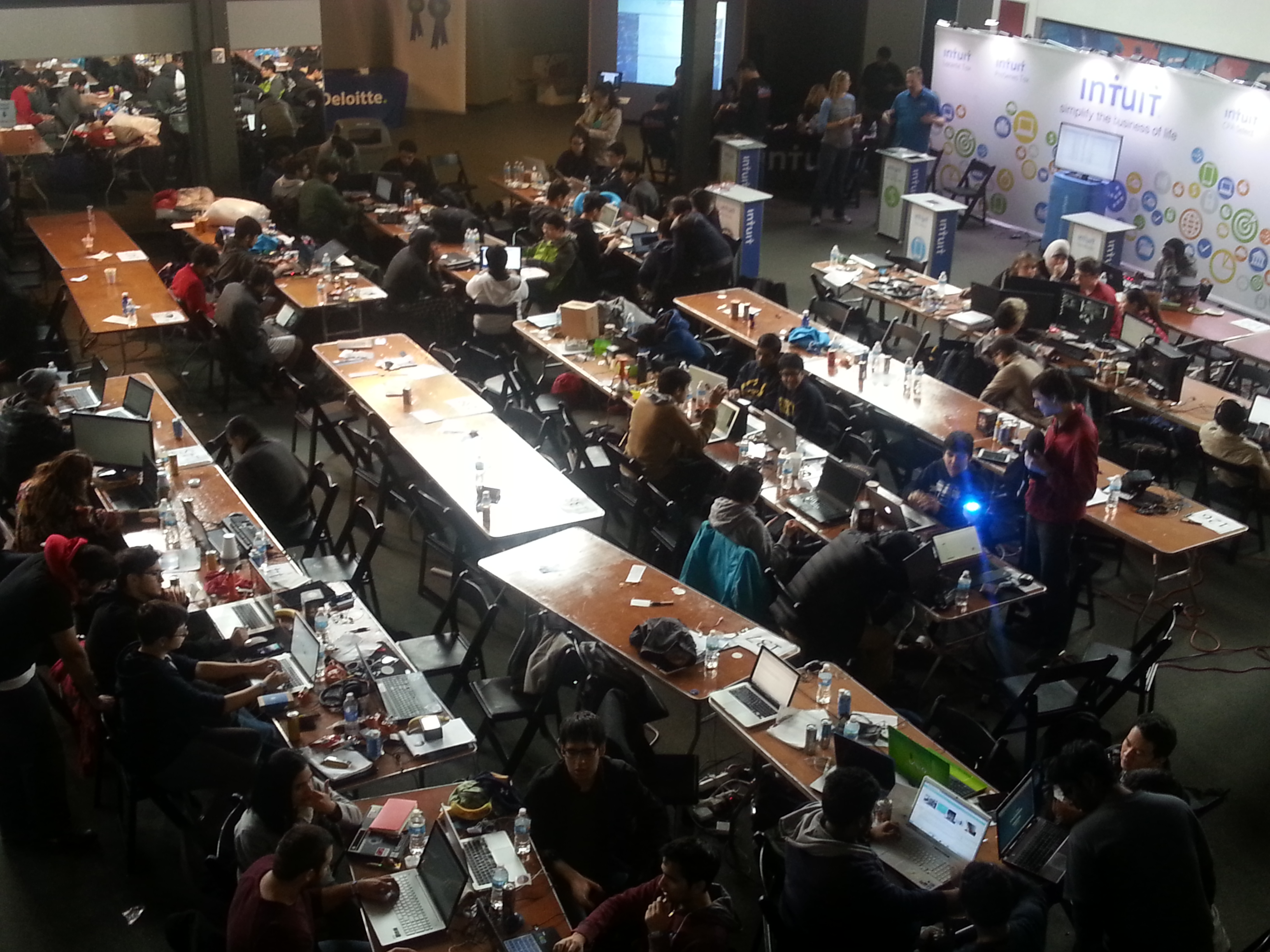
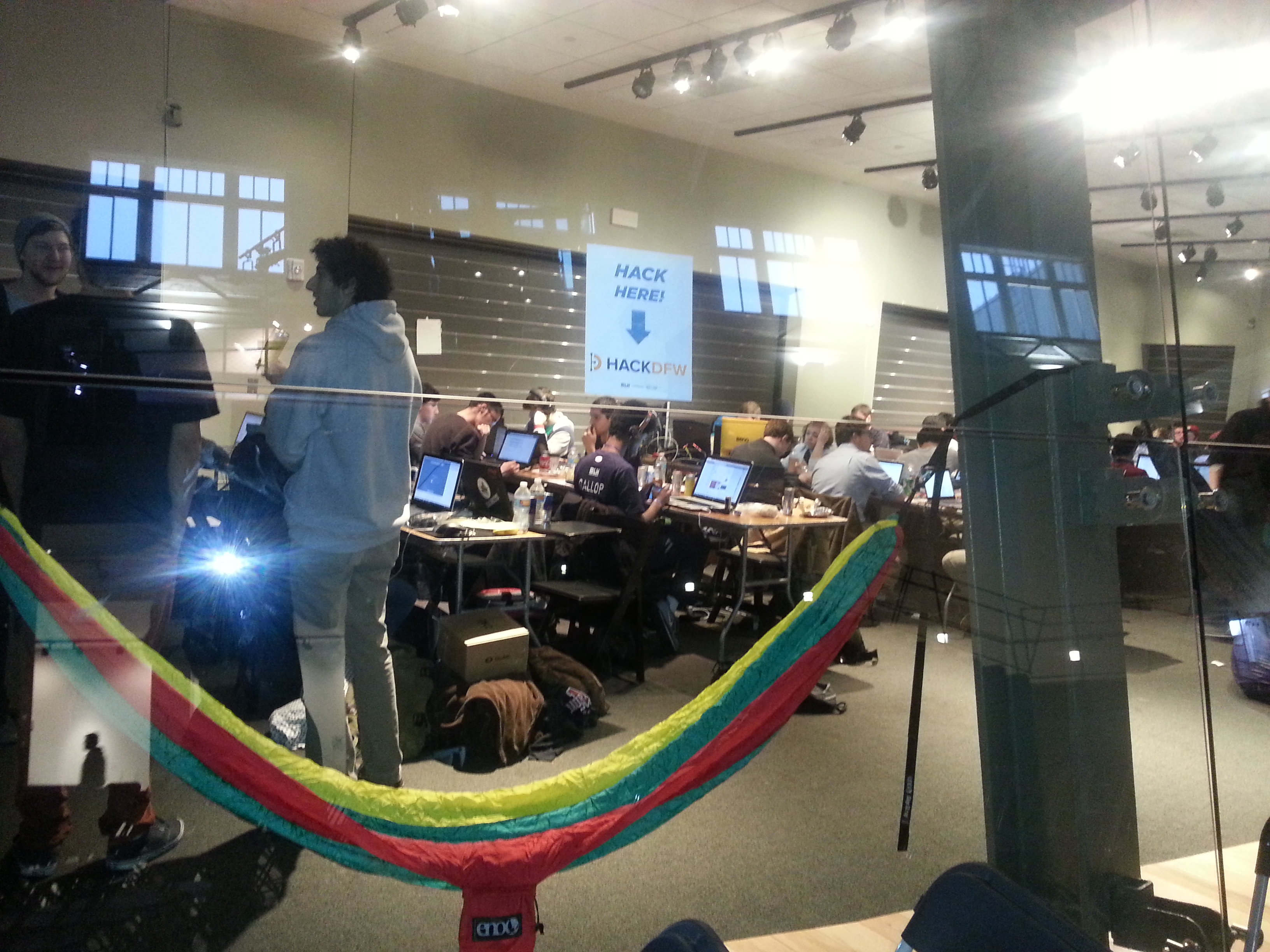
Here a few pics from the event.

Looking down on one of the groups

Looking down on one of the groups


Hackers and Hammocks

Hackers and Hammocks

Taking a "short" nap

Taking a “short” nap

Extra-credit reading

Pau for now…


Update 2: Dell XPS 13 laptop, developer edition – Sputnik Gen 4

February 23, 2015

Updated March 6:  Although this was mentioned by Mario in the comments below I wanted to make sure everyone saw this:

A01 is out:

http://www.dell.com/support/home/us/en/04/Drivers/DriversDetails?driverID=RHPC0&productCode=xps-13-9343-laptop

Put it in /boot/efi since that is also a FAT partition–or on a FAT formatted USB stick, reboot, hit f12, and select the option to update the firmware.

 =====================

Two weeks ago I posted an update on the XPS 13 developer edition mentioning that we were addressing a few issues before we felt the was ready to launch.  Now that we are a little further along, we SputnikScientist2wanted to provide more details.

The main issues that are delaying launch involves the touchpad and a repeating keystroke issue.

Status update around the issues:

  • Working on getting A01 BIOS out (fixes keyboard repeating keystroke issue)
  • We confirmed that A01–with acpi_osi and resetafter kernel parameters–is a workaround that makes the touchpad work smoothly
  • Sound works with above workaround
  • Mario Limonciello on the Sputnik team  submitted a patch upstream to have the resetafter workaround done automatically:  http://lkml.iu.edu/hypermail/linux/kernel/1502.2/02389.html

More details:

  • The acpi_osi kernel parameter: Adding acpi_osi=”!Windows 2013″ as a kernel boot parameter followed by two cold reboots switches the audio to HDA mode (which Linux currently supports) and puts the touchpad into PS/2 mode.
  • The resetafter kernel parameter: Adding psmouse.resetafter=0 as a kernel boot parameter when the touchpad is in PS/2 mode allows the touchpad to not reset (which is actually what happens with this touchpad in PS/2 mode on Windows 7).

Please visit the Dell TechCenter Project Sputnik forum for discussion.

Thanks everyone for your support and we appreciate your patience as we work with our partners to resolve these issues.

Extra-credit reading

Pau for now


Available in Europe: Precision M3800 developer edition

February 16, 2015

At the end of January we announced the launch of the Dell M3800-ubuntuPrecision M3800 mobile workstation, developer edition.  This beefy complement to the existing XPS 13 developer edition is the direct result of feedback from the community who have been asking for a larger system.

Over the past few weeks we have been adding EMEA availability.   Here is the list of countries where the M3800 developer edition is available online.  For those countries that don’t appear here, the system is available offline by calling a sales representative.

M3800 developer edition — European online availability

We are currently working on rolling out the M3800 developer edition in the Asia Pacific/Japan region as well.  Stay tuned!

Extra-credit reading

  • Welcome the Dell Precision M3800 mobile workstation, developer edition – Barton’s Blog
  • Update: Dell XPS 13 laptop, developer edition – Sputnik Gen 4 – Barton’s Blog

Pau for now…


Update: Dell XPS 13 laptop, developer edition – Sputnik Gen 4

February 5, 2015

We have been getting a ton of questions around the 4th generation Sputnik (XPS13 Sputnik_Sticker_Finallaptop, developer edition) and when it will be available.  As you may have seen, last week at Sundance we broke the news of our brand new Dell Precision M3800, developer edition pre-loaded with Ubuntu.

The XPS 13 isn’t far behind. We’re getting close and will have more to share soon but ultimately are spending time making sure everything works to provide the best customer experience possible.  A word of caution, if you purchase the Windows version of the new XPS 13 and try to load Ubuntu on it you will run into a few issues that we are currently addressing.

Please realize this DOES NOT AFFECT the Windows version of the XPS 13 laptop that recently launched.

Stay tuned for more updates soon.

The Reviews are in

XPS 13:  For your reference here are just a handful of awesome reviews that the Windows version of the recently launched XPS 13 laptop has garnered.  (The developer edition is based off this.)

  • Dell’s New XPS 13 Laptop Makes Me Seriously Regret My MacBook Air Purchase – Forbes
  • The MacBook Air Meets its Match – Wall Street Journal
  • Stunning screen, compact design make XPS 13 the first great laptop of 2015 – CNET
  • Dell’s Gorgeous New Windows Laptop Has An Amazing Screen And Is Cheaper Than The MacBook Air – Business Insider
  • Dell puts Apple’s MacBook Air on notice at CES – FOX News
  • Dell XPS 13 Boasts Thinnest Screen Bezel Ever – LAPTOP Mag
  • Dell’s New XPS 13 Sounds Like The Laptop Of My Dreams – Gizmodo

M3800 developer edition: Also for your reference, here is a bit of the press coverage the M3800  developer edition received

Extra-credit reading


Pau for now…


Welcome the Dell Precision M3800 mobile workstation, developer edition

January 27, 2015

Update March 17:  Great  review in Network World — Review: Dell’s Ubuntu-powered M3800 Mobile Workstation is a desktop destroyer

Since the planning stages of project Sputnik over two years ago we wanted to offer two versions of our developer-focused systems.  The idea was to have both an ultra mobile laptop and a beefier workstation offering, a beauty and the beast line up if you will.  Due to the need to focus our resources however, we worked with the community to first build out the laptop, delivering the XPS 13 laptop, developer edition.Soyuz

Moving towards the beast

The first year after launching the XPS 13, we got a steady stream of requests for a bigger system.  This wasn’t lost on team member Jared Dominguez who decided to work on his own time with the Dell Precision M3800 mobile edition and put together instructions on how get Ubuntu running on the system.

A little over a year ago with the launch of the 3rd generation of the XPS13 developer edition we also announced its “unofficial big brother” and provided Jared’s instructions.  We received a lot of great feedback but there were also folks asking when we were going to deliver an officially supported version of the M3800.  What we told the community was — like the initial project Sputnik offering, if we got enough positive feedback — we might be able to offer it as an official pre-installed system.

A thread was started on the Sputnik Forum for people to express their interest in an official system.  We got a tremendous amount of positive feedback and as a result we listened to our customers and have added the M3800 to our developer edition lineup of Ubuntu-based systems.

Introducing the Dell Precision M3800 mobile workstation, Developer Edition

One of the main features people were looking for in the Precision M3800 was 16 GB of RAM.  The new Ubuntu-based M3800 introduced today, has that and a whole lot more:

Dell Precision M3800 mobile workstation, dev edition – Key features

  • Preloaded Ubuntu 14.04 LTS
  • Next generation of the world’s thinnest and lightest true 15-inch mobile workstation
  • Starting weight of just 4.15lbs (1.88kg) and a form factor that is less than 0.71 inches (18mm) thick
  • Fourth generation Intel Core i7 quad-core processor, professional grade NVIDIA Quadro K1100M graphics, and up to 16GB of memory
  • 4K Ultra HD (3840×2160) screen option
  • Availability: worldwide

Unfortunately, one of the features that wont be available right out of the gate is thunderbolt support.  As Jared explains in his blog:

Because our factory Ubuntu installs only ship Ubuntu LTS releases, we were not able to ship with Thunderbolt support. However, thanks to the hardware-enablement stack in Ubuntu, starting with upcoming Ubuntu 14.04.2, you will be able to upgrade your kernel to add some Thunderbolt support. We plan to be working with Canonical to recertify the Precision M3800 with official Thunderbolt support.

How do I get one

You can get to the M3800 developer edition by going to the Dell Precision M3800 Mobile Workstation page: www.dell.com/create and choosing the system labeled “Fully Customizable” on the far left.  Or you can go directly to configurator, where under “Operating System” you can select Ubuntu 14.04 SP1 and away you go!

M3800Menu

What about the additional software?

This time around we went with the vanilla image of the most recent LTS release (14.04).  A vanilla image was actually one of the top requests when we gathered input on our initial Storm session.

Since the original launch we have been working on a profile tool and Cloud launcher.  We are still working on these but it’s been a bit more difficult than we originally thought :).  Stay tuned for more news on this.

Will there be a new XPS 13 developer edition?

You bet!  The 4th generation of the XPS 13 laptop, developer edition will be available soon.  It will based on the the new XPS 13 laptop that debuted earlier this month.

A Big Thanks

Thanks to everyone in the community for the tremendous support of the Sputnik program.  Without your support, this program would not be possible!

 Extra-credit reading

Pau for now…


Installing Debian 8 on a Dell XPS 13 Developer Edition

January 3, 2015

Over the break, Eric Mill put together great step-by-step instructions showing how to install Debian 8 (Jessie) on a Dell XPS 13 Developer Edition.  Eric also had some great things to say about the laptop and program themselves:

Dell calls their program Project Sputnik, and it is managed by a friendly team of Linux engineers inside Dell who partner with Ubuntu to ensure that your computer will Just Work with Linux.

The Dell XPS is also used by multiple Debian team members, so your pain points will be theirs, and they’re likely to quickly fix things.

Supporting Dell’s program is a wonderful thing to do, and it’s also just a great goddamned laptop.

Check out Eric’s Instructions and away you go!  Installing Debian 8 on a Dell XPS

Pau for now…


2014 in review – My Blog

January 2, 2015

The WordPress.com stats helper monkeys prepared a 2014 annual report for my blog.

Here’s an excerpt:

The concert hall at the Sydney Opera House holds 2,700 people. This blog was viewed about 42,000 times in 2014. If it were a concert at Sydney Opera House, it would take about 16 sold-out performances for that many people to see it.

Click here to see the complete report.


Nutanix and Dell’s Web-scale converged appliance

November 22, 2014

Here is my final post from Dell World.  Today’s interview is with Nikita Maheshwari, product marketing manager with Nutanix.

I caught up with Nikita on the show floor in front of their booth.   I got her to give a brief overview of the company and what they announced with Dell at the show.  Check it out.

Some of the ground Nikita covers

  • Describing Nutanix’s software-based converged infrastructure platform and where their IP lies
  • Who are some of the customers they’ve been working with and what use cases they are seeing
  • Announcing the shipping of the first of five Dell XC Web-Scale Converged Appliances with Nutanix preloaded
  • What Nutanix and Dell have up their sleeves for the upcoming year

Extra-credit reading

  • Dell Set To Ship OEM Nutanix-Based Hyper-Converged Infrastructure Appliances – CRN
  • Dell inks OEM deal with Nutanix to build mutant server, storage, networking beasts – The Register

Pau for now…


Learning about Dell’s OpenStack private cloud offering

November 21, 2014

The week before last I was roaming the expo floor at Dell World and I bumped into Steve Croce.  Steve is at Dell and is the product manager and strategist for our OpenStack private cloud offering.

I got Steve to spend a few minutes with me and give me the lowdown on what we are offering and where Red Hat plays in.  Take a listen.

Some of the ground Steve covers

  • Who’s Dell targeting with our offering and how has that expanded
  • What is the stack comprised of: Hardware, Software and Services
  • Dell IT’s internal innovation lab running Red Hat’s OpenStack distro
  • What can we expect to see in the upcoming year

Extra-credit reading

Pau for now..


Red Hat’s OpenShift PaaS, what its about and where Dell fits in

November 18, 2014

The next interview in my series from Dell World features Julio Tapia of Red Hat.  Julio is a global director for Red Hat’s platform as a service, OpenShift.

I got Julio to give me a quick overview of OpenShift, where Dell plays and what they are planning going forward.

Some of the ground Julio covers

  • Who is OpenShift targeted at and how does it benefit developers
  • The three flavors: Online (Public PaaS), Enterprise (Private PaaS) and Origin (Community PaaS)
  • How Dell is working with OpenShift and the DevOps in a Box they both announced
  • The role Docker plays
  • What’s in store for next year and how their work with Google and Kubernetes will help ISVs

Extra-credit reading

Pau for now…


Talking to Red Hat about how they are working with Dell on OpenStack

November 12, 2014

Last week I participated in Dell World with my trusty Flipcam (yes, I still have one, if it ain’t broke…) and caught a bunch of interviews.  Several, not surprisingly, dealt with the cloud space.

The first  of these is with Red Hat Sr. Solution Architect, Ian Pilcher who was on the expo floor.  Ian was talking to attendees about how Red Hat and Dell are working together in the cloud space.  I got him to give a short overview.

Some of the ground Ian covers

  • How the two companies are working together around OpenStack
  • What are the use cases he’s seeing for the OpenStack solution
  • What is Red Hat doing with Docker (Hint: see Atomic Host)
  • What to expect from Red Hat and Dell vis-a-vis their OpenStack solution

Extra-credit reading

  • Red Hat goes nuclear in Linux container wars with Atomic Host beta – The Register

Pau for now…


Digital Transformation – How to avoid becoming digital prey

November 11, 2014

Last week at Dell World I interviewed a bunch of folks and will be posting these videos in the upcoming days.  On the last day of the event however I got to sit on the other side of the camera and talk about Digital Transformation.

Take a listen below as I explain what I’ve learned and how Digital Transformation is affecting organizations today.

Some of the ground we cover

  • What is “Digital Transformation?”  Why all of a sudden does it seem to be the buzz word du jour?
  • The importance of placing the customer in center of your thinking.
  • Which organizations have transformed successfully and why and who has become digital prey.
  • How does it leverage technologies like cloud, social, mobile and big data/analytics?

Extra-credit reading

Pau for now…


Dell Cloud Marketplace launches public Beta

November 5, 2014

Today at Dell world, we are rolling out the public beta of the Dell Cloud Marketplace.  The marketplace, which is targeted at both sys admins and developers, allows you to set-up, manage, monitor and pay for a variety of cloud services in a self-service model.

The IaaS platforms available at launch are provided by Amazon Web Services, Google Cloud Platform and Joyent.  Cloud services partners include Docker for application development, Pertino for cloud networking and data management provided by Delphix.

Yesterday before the show kicked off I grabbed some time with the marketplace’s chief architect, Campbell McNeill to learn more.  Take a listen to what Campbell had to say:

Some of the ground Campbell covers:

  • What they learned from this summer’s private beta and how they have rearchitected the marketplace accordingly (focusing on control and governance and leveraging the features of the Enstratius acquisition).
  • A market place catalog where you can get apps running in Docker containers and then run them in the cloud of your choice.
  • Providing developers with agility while at the same time giving those tasked with security and compliance a governance control plane.
  • Sign up today and get $500 free credit and give us you thoughts and help us to further refine improve the marketplace.

Extra-credit reading

  • Dell Cloud Marketplace: Many Clouds, One Dashboard — InformationWeek
  • Dell launches into cloud brokerage market with Cloud Marketplace — ZDNet
  • Dell Tests Public Cloud Waters With Beta Marketplace Offering — CRN

Pau for now…