Yesterday at Dell World, Dell’s annual customer event, I did a session entitled: DevOps, Containers and Microservices: Buzzwords or fundamental to survival?
The idea was to explain these concepts, show how they serve as a foundation for digital transformation and talk about where Dell plays in the space. (see abstract below)
Topics and times
2:20 – 5:54 What is DevOps?
6:58 – 9:30 What are containers?
10:24 – 12:30 What are microservices?
12:30- 15:00 Where does Dell play? (professional services, testing, creating MVPs)
Check it out.
Abstract:
Gartner believe that by 2016, DevOps will evolve from a niche strategy employed by large cloud providers to a mainstream strategy employed by 25% of the largest 2000 global organizations [1]. One of the key developments within this space is Container technologies. In turn both DevOps and container technologies are proof of a larger shift in IT to a microservices architecture.
These technologies together serve as the foundation for agility and responsiveness in the modern enterprise. They give organizations an increased ability to serve their customers and, more importantly, are ultimately key to organizational survival in the modern world . This session will explain these technologies in terms of what they mean to your business and how they fit within larger trends in the industry.
[1] Tech Go-to-Market: How to win with DevOps buyers, May 15, 2015; Gartner
The XPS 13 9343 utilizes the Microsoft Precision Touchpad specification in I2C mode. The specific feature within the Microsoft Precision Touchpad specification is the “Confidence” feature:
Confidence
Confidence is used to indicate that the contact does not have any dimensions (height or width) > 25mm that implies that it is not an unintended contact. Windows Precision Touchpads should not reject any contacts in firmware processing, but should forward all contacts to the host and indicate the confidence. After a device has deemed a contact to be unintentional, it shall clear the confidence bit for that contact report and all subsequent reports. Until a contact has been deemed unintentional, the device shall set the confidence bit for that contact being reported.
With that feature correctly implemented, palm rejection in I2C mode should work.
Driver feature development is something we work with our vendors on ensuring they develop, though in this case they won’t since the Microsoft Precision Touchpad specification is a feature that falls outside of vendor-specific needs. Synaptics (or any other touchpad vendor) is unlikely to implement this feature in the Linux i2c_hid driver because it’s not vendor-specific but instead a Microsoft specification.
Here is information addressing the lack of palm detection with Ubuntu 15.04. A big shout out to Pilot6 who developed the steps below and shared them with the community on Ask Ubuntu
Some customers have reported frustration with the lack of palm detection due to limitations with the Synaptics driver currently implemented in current stable versions of the Linux Kernel. This walkthrough is intended for advanced users who would like to experiment with the alternate libinput input device driver. This has only been tested to work in the XPS 13 9343 using Ubuntu 15.04 and 15.10 beta.
Note: these steps are not supported by Dell support and you are performing this at your own risk. Compatibility issues could arise and result in your operating system being rendered unable to boot.
Install some needed packages by running the following commands.
Now we need to create the config file in /usr/share/X11/xorg.conf.d named 99-libinput.conf using your favorite text editor (the following example will be using gedit).
Add the following to the blank file you just opened, these options should cause the touchpad to perform similar to an Apple Mac touchpad.
Section “InputClass”
Identifier “libinput”
Driver “libinput”
MatchDevicePath “/dev/input/event*”
MatchIsTouchpad “true”
Option “Tapping” “true”
Option “TappingDragLock” “true”
Option “ClickMethod” “none”
Option “NaturalScrolling” “true”
EndSection
There are many more options available. Not all options are supported, if the option is not supported than the default will be used. In the above example “Natural Scrolling” is set to “true”. If you don’t like natural scrolling just set that option to “false”. Follow the below link for an explanation of the many options that are able to be adjusted in the 99-libinput.conf
In addition to the recent fixes I posted for the XPS 13 developer edition, here is one more from the team.
thanks
Broadcom bug
Some customers may experience an issue where their system crashes when switching wireless networks while running the factory install of Ubuntu 14.04. The issue appears to be a bug within the Broadcom wireless driver. You can follow the bug report at the following link:
There are two methods to apply the patch detailed below:
Method 1
Run the following command to add the repositories using your package manager:
sudo add-apt-repository ppa:inaddy/lp1415880
Method 2
You can also add the repositories to your /etc/apt/sources.list file manually. Just add the following lines to the end of the sources.list file as in the screenshot below (requires root access).
Here is my penultimate interview from ContainerCon. Today’s video features Arjan van de Ven of Intel, the lead for The Clear Linux Project. Clear Linux is Intel’s uber light weight OS and is targeted at cloud use cases.
Take a listen as Arjan takes us through the project.
Some of the ground Arjan covers:
Clear Linux as a modular micro distro that demonstrates how Intel’s hardware can be used.
How Clear Linux supports both containers and VMs
What’s coming in the next year for the Clear Linux project
About a month ago we stopped new sales of the XPS 13 developer edition in order to address a few issues. A couple weeks ago we started selling the systems again.
For your reference, here are the details around the fixes:
Suspend resume and trackpad cursor freezing: The suspend resume issue and trackpad cursor freezing issue have been rolled up into “over the air” updates from Canonical. We previously had patches that were available through Dell Knowledgebase articles but will no longer be necessary. Going forward you only need to ensure your OS is fully updated to have these fixes in place.
Out of box crashing: The out of box experience crashing issue has been fixed through a change to the Ubuntu image put on the systems at the factory. All future systems shipped will no longer have this issue from the factory.
DisplayLink driver available: There is now a DisplayLink driver available to make the XPS 13 and M3800 developer editions compatible with our D3000 and D3100 USB 3.0 docking stations as well as the DA100 external video adapter. You can download the driver at the below link. http://www.displaylink.com/downloads/ubuntu.php
Kernel panics when switching wireless networks: there is a bug report filed for this and Canonical and Broadcom are both working on this. Canonical released a PPA, just go to the following link and add it to your repositories and then you can get the patch after running your normal updates. https://launchpad.net/~inaddy/+archive/ubuntu/lp1415880
Last week at Container/LinuxCon I conducted a handful of video interviews. Video number three stars Brian Dorsey from Google. Brian works with developers to get them up to speed with Kubernetes.
Here’s what Brian had to say:
Some of the ground Brian covers
Brian’s focus on cloud-building developers, specifically those working on Kubernetes
Key partners such as Red Hat, CoreOS, Kismatic and many, many more
How Brian and the team reach developers (events, blogs, videos, sample code…)
Where he sees Kubernetes going over the next year
Extra-credit reading
Google Hopes Open Source Will Give Its Cloud A Path To The Enterprise – TechCrunch
A couple of weeks ago I took a new position here within Dell. I’m now in
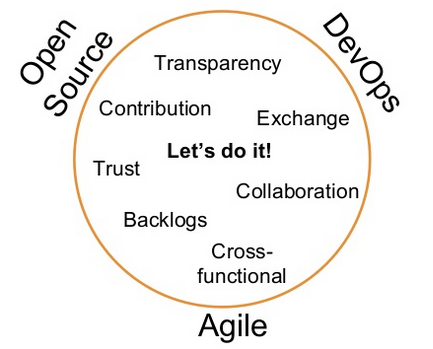
Source: Schlomo Schapiro, OpenTechSummit 2015
the office of the CTO in our enterprise solutions group. In my new role the main areas I will be focusing on are DevOps and OpenSource. And, because you can’t swing a dead cat without hearing about “containers,” I will be looking into that as well. (I will also continue to drive Project Sputnik, the XPS 13 and M3800 developer editions)
While Dell has a bunch of activities in the above areas, they tend to be scattered across the company and we could do a better job of connecting them. This will be one of my internally focused tasks, helping to get these efforts more aligned in order to better help our customers.
Externally I will be talking with customers, vendors and partners to see how we can go about creating viable and valuable POCs that will hopefully lead to bigger solutions. Just like we did with project Sputnik, the idea will be to be transparent about these efforts and to start small and iterate. With the goal of applying lean/agile principles our approach will be to put together quick, basic POCs that we can make available for customers to access and give input on. The goal will be to draw on continuous feedback and course correct as we go.
That’s the plan at least. Watch this space to see how it all unfolds 🙂
Rancher Labs debuted late last year and it has already made quite a splash. Rancher positions itself as a complete infrastructure platform for running Docker in production or, putting it another way, it provides infrastructure services reimagined for containers.
Sheng Liang, who previously founded Cloud.com and then sold it to Citrix, is one of the founders of Rancher Labs and their CEO. I pulled Sheng away from the booth here at ContainerCon and asked him about his latest venture.
Some of the ground Sheng covers
What is Rancher labs and its main offerings: RancherOS (an uber light OS) and Rancher (a management platform for hosts and containers running on those hosts)
Where Sheng got the idea for Rancher labs
How they have taken in customer feedback and innovated to create offerings that hadn’t originally thought of e.g. RancherOS
Yesterday at ContainerCon here in Seattle I ran into Mark Shuttleworth, founder of Canonical and the man behind Ubuntu. I asked Mark about some of the efforts Canonical has been focusing on recently and this is what he had to say:
This is what Mark had to say:
Some of the ground Mark covers:
Ubuntu on the mainframe
LXC (client) and LXD (on servers) which creates, migrates and kills containers
The recent Microsoft announcement that REST APIs from LXD will be implemented on windows
Canonical’s IoT work which leverages their efforts in the mobile area.
How Ubuntu Snappy works, why they built it and where are all the places its being used including drones
Their OpenStack work including connecting LXD w/openstack and using containers instead of VMs. Also how to make much larger openstack clouds and build the ecosystem.
Props for the 4th Generation of Project Sputnik, the XPS 13 developer edition laptop
The other day Canonical came to Dell for a show and tell. The Sputnik team, normally located in various buildings in Austin and Round Rock, all found ourselves in attendance at the event. Here is a quick meet-the-team video introducing ourselves, saying where we’re from and declaring our favorite TV show.
Additionally, here is a short case study giving the Project Sputnik history.
This morning at OSCON a special event was held to announce the launch of Kubernetes 1.0 (Google’s open source container management framework) as well as the introduction of the Cloud Native Computing foundation.
One of the key speakers at the event was Craig McLuckie of Google who is a founding member of Kubernetes’ team. Craig has also been working with the Linux Foundation to set up the Cloud Native Computing foundation.
I sat down with Craig for a quick chat regarding both of these efforts.
Some of the ground Craig covers:
Craig’s role at Google and his relationship with Kubernetes
Today’s announcement as it relates to both Kubernetes 1.0 and the Cloud Native Computing foundation.
Where does Craig see Kubernetes going over the next year and what new workloads will it run
Extra-credit reading:
As Kubernetes Hits 1.0, Google Donates Technology To Newly Formed Cloud Native Computing Foundation – TechCrunch
Cloud Native Computing Foundation seeks to forge cloud and container unity – ZDNet
Linux Foundation wrangles app container wranglers into new org – The Register
We are aware of some issues that need to be addressed with our XPS 13 developer edition. While patches have been made available (or coming soon), we are working to add these fixes to the systems at the factory.
Given that we want our customers to have the best experience possible, we have temporarily stopped new sales of the XPS 13 developer edition. Our desire is to bring back the system as soon as possible, but only after we have resolved the outstanding issues at the factory level. [Please realize that this DOES NOT AFFECT the windows version of the XPS 13]
We apologize for the inconvenience and thank you for your support and patience.
Back at the end of April I gave an internal presentation laying out a high level overview of the container and container management space. I pulled this together using public info.
Needless to say big things have happened since I created it, most notably the announcement of the Open Container Project. That being said it I feel it still offers a good general feel for the players and how they fit together.
Announced today under the Linux Foundation banner, the Open Container Project has the backing of the major forces in cloud and containers, including Docker and appc. – ZDnet
New Open Container Project Helps Define the Future Data Center – Jim Zemlin’s blog, the Linux Foundation
Once again we want to thank the entire community for your posts containing feedback and questions to the Dell TechCenter forum and this blog regarding the Ubuntu-based XPS 13 and M3800 developer editions.
Last month we posted links to four knowledge base articles addressing: wireless drivers, keyboard repeat, suspend/resume and cursor freezes. Today we are adding three more that have been hot topics recently: creating recovery media, OOBE crashing, and 15.04 UEFI install. So we have all the articles in one place I have also included the previous ones below.
Knowledge Base links:
How to create recovery media for the XPS 13 9343 and Precision M3800 Developer Editions:
Remember, in addition to posting your feedback here, we encourage customers to utilize their support contracts and contact the included Dell support (either Consumer Support or ProSupport, depending on whether you purchased it from the Consumer or Small Business sections). This will help us to officially track issues and tackle them systematically.
How to reach ProSupport:
Via email (to choose your country look in the bottom right corner)
Last but not least here is the final video from DevOps days Austin featuring the one and only John Willis aka Botchagalupe. John gave the closing key note using an intriguing comparison to Jared Diamond’s Guns, Germs and Steel.
Take a listen:
Some of the ground John covers:
John’s DevOps background
From Socketplane founder to Docker employee
The convergence of data gravity, containers and microservices – The new guns, germs and steel
How John got involved with the Docker folks back in the dotCloud days.
Last month at DevOps Days Austin I did a series of interviews with a variety of speakers and attendees. One of the attendees I chatted with was Cameron Haight of Gartner. For the past five years Cameron has been writing about, and advising clients on, DevOps.
I caught some time with Cameron to get his thoughts.
Some of the ground Cameron covers:
How Cameron came to cover the DevOps movement.
What changes has he seen in the community over the past five years.
How does Cameron see DevOps evolving as it moves into the mainstream and where it fits within the larger transformation enterprises are undergoing.
Stay tuned for the final interview in this series starring the one and only John Willis.
In the last few weeks Dell has expanded its consumer line up with additional Ubuntu machines: both the economical Inspiron series as well as the high-end, XPS 13 developer edition.
The new economical Ubuntu laptops are made up the Inspiron 14 3000 and Inspiron 15 3000 (14 & 15 denote the screen size) which each offer four configs. All configs of both the 14 and 15 are non-touch.
Celeron/4GB/500GB + optical drive from SAPP: $279.99
Pentium 4GB/500GB: $279.99
Pentium/4GB/500GB + 2 year mail in service (the above all come with 1 year mail in service): $349.99
XPS 13 developer edition
The XPS 13 developer edition, which in the states has been available only to businesses, is now available to consumers as well. The four consumer configs are a bit different than those in business:
We want to thank the entire community for your posts containing feedback and questions to the Dell TechCenter forum and on this blog regarding the XPS 13 and M3800 developer editions (Ubuntu).
In response to your feedback, here are the first three Knowledge Base articles focusing on the hottest issues. This post and the Knowledge Base will be updated if new issues crop up.
Remember, in addition to posting your feedback here, we encourage customers to utilize their support contracts and contact the included Dell support (either Consumer Support or ProSupport, depending on whether you purchased it from the Consumer or Small Business sections). This will help us to officially track issues and tackle them systematically.
Please continue to give us your feedback on the Developer Edition systems.
June 3, update: How to reach ProSupport:
Via email (to choose your country look in the bottom right corner)
Here is the third post in a six part series focusing on DevOps Days Austin. Following Cote’s presentation, next in the line up of speakers on day one was Paul Read of Release Engineering Approaches.
Paul’s talk tackles the “importance of continually breaking your organization with experiments, some surprising examples, and how to do it in such a way that you aren’t left with a broken organization.”
Take a listen, and check out his awesome tie! (also see his slides below)
Some of the ground Paul covers:
Learning from Toyota Kata
The culture of continuous learning and experimentation/improvement


 Posted by Barton George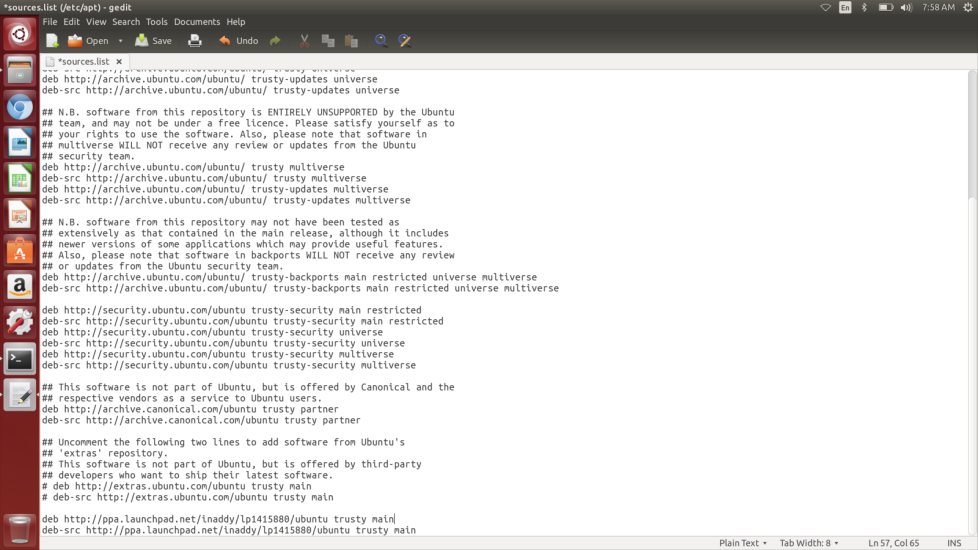

 3000 and Inspiron 15 3000 (14 & 15 denote the screen size) which each offer four configs. All configs of both the 14 and 15 are non-touch.
 The XPS 13 developer edition, which in the states has been available only to
  Barton's Blog