I first met Lew Moorman, Rackspace’s Chief strategy officer, at Rackspace’s big Cloud Event back in October. It was at this event that Rackspace, through acquisitions as well their friendly annexation of Mosso, positioned itself as a major cloud player.
I caught up with Lew during the slow time over the holidays and we chatted about his thoughts and predictions for Cloud Computing.
Lew, a self-portrait (lifted from his twitter page)
The reason cloud computing is getting all the attention it is is because it represents the paradigm shift of consuming IT as a service.
The cloud is all about consuming your IT over the web, on the WAN as opposed to the LAN, from a centralized provider and you don’t have a concept of the assets that are being used to deliver that IT.
How the recessionary environment is helping to speed along the adoption of the cloud.
How Rackspace plays in all three areas of cloud computing: Infrastructure as a Service (storage and compute power are the cornerstones), Platform as Service (the ability to deploy code on ready-made platform) and Applications as a Service (aka SAAS).
Is “Internal Cloud” an oxymoron?
Which type of players are likely to be the winners in this space.
The day after Christmas, the whole multi-generational family made the trek out to Fredericksburg, a little slice of Deutschland in the middle of the Lone Star state, for some yummy beer and schnitzel. We had a great time, particularly with the 80 degree weather, but the real sights appeared on the way home.
As we made our way back, we passed through Johnson City, birthplace of LBJ and named after a distant relative of his. Much to our surprise, we stumbled upon an amazing display of lights (which I later learned is the Hill Country Christmas Lights). Here are my favorite pics from the night.
It would be awesome to take a carriage ride next year.
As the year 2008 draws to a close one more Lombardi Blueprint release has just just gone live.
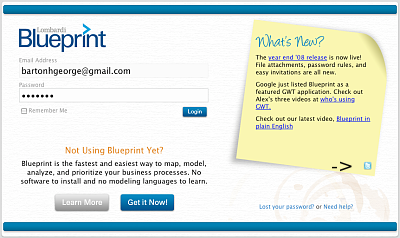
The login-screen has been cleaned up (except for the coffee stains)and “Twitter-fied.”
The release, code-named “Quiet Riot” (in keeping with the official Blueprint code-naming schema) is characterized by a bunch of cool new features (you can read about them in detail or see the short overview video on Dave’s Blog) designed to make this process mapping tool more collaborative, more powerful and even easier to use.
Here is the high-level list:
File Attachments: These are powered behind the scenes by Mosso’s Cloud Files and allow you to attach screenshots, word docs, spreadsheets etc. Additionally, your files are conveniently added to the same place you collect other information regarding a particular process step.
Easy Invites: Looking to give the gift of Blueprint this holiday season? Well it just got easier. We’ve cleaned up the homepage and now to invite someone all you need to do is to type in their email address in the space prominently located at the top of the page.
Password Rules: Password strength can be set at one of three different levels (high, medium or minimum) using a handy slider bar.
Twitter: This Enterprise 2.0 app just got 2.0-ier
Enterprise 2.0 features like collaboration via wiki-like functionality and IM are at the center of Blueprint. Now in this latest release we’ve added a Twitter feed which powers the “What’s New” section on the login page (see the screenshot at the top of the page).
If the thought of Twitter sounds a bit intimidating, don’t worry, the feed on the login page is transparent to you, all you will notice are postings that are updated from time to time.
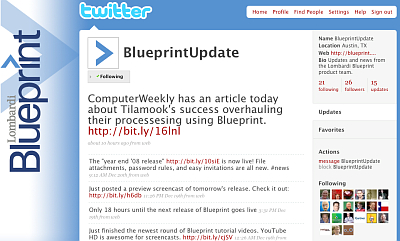
If you do want to follow the Twitter feed directly along with your other feeds, click on the little Twitter icon (in the bottom right corner of the yellow sticky) and you’ll be taken to the actual Blueprint Update Twitter page where you can see all the posts. Obviously Twitter works both ways so we’re looking forward to collecting feedback from you as well.
Check out the Blueprint Twitter feed directly at: twitter.com/BlueprintUpdate.
Hope you enjoy Quiet Riot. As always the 6-7 week release beat goes on. Who’s up next? R.E.O Speedwagon.
These days when people describe cloud computing you’ll often hear them dividing it into three basic groups:
Application Clouds (aka Software as a Service or SaaS)
Platform Clouds (aka Platform as a Service or PaaS)
Infrastructure Clouds (aka Infrastructure as a Service or IaaS)
Besides self-interest (a cloud-based app helps me pay my bills), I find the first group above the most interesting as well as the most tangible for the average bear.
So what does the board think?
A couple of weeks ago the Data Center Advisory board over at Searchdatacenter.com was asked to weigh in with their thoughts on cloud computing. RedMonk analyst Michael Cote offered up his SaaSy perspective as follows:
IT managers should be looking at converting their on-premise infrastructure to what we recently called “Software-as-a-Service” and now the bucket of “cloud computing.” If your email isn’t in the cloud already, there should be a fantastically good reason, like regulations that prevent off-premises email.
Can you host your instant messaging in the cloud? How about file sharing and basic intranet functions? Even things like SharePoint look attractive. Essentially, you want to inventory all of the low-priority items you have on your intranet and ask if it’s cheaper to move them off-premise.
Although I would have chosen a less pejorative term than “low-priority items,” I think Cote’s advice is spot on. He then goes on, while warning against irrational cloud exuberance, to clearly list the key advantages of move apps to the cloud:
Top of the list tends to be cost (both up-front and ongoing, especially when it comes to upgrading and maintenance) but also flexibility and new functionality that come with cloud-based applications.
1. that we’ve signed Google’s corporate contributor agreement
2. that we’re adopting GWT (Google Web Toolkit) as a core part of JBoss Middleware
The world doesn’t need another Java framework for developing rich AJAX apps. so we’ve decided to go with what we think is a real leader – Google Web Toolkit. (Read more)
(I hope this doesn’t mean that JBoss will be replacing us as the self-proclaimed GWT poster child 😉 )
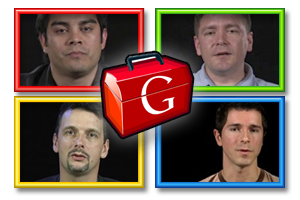
GWT draws inspiration from the Brady Bunch (does that make Alex, Cindy?)
And in other News
In other GWT related news today, Google posted a timeframe and details for their next release, 1.6. And as if that wasn’t enough, Google also posted four sets of developer videos where each of the four gentlemen (including Lombardi Blueprint‘s very own Alex Moffat) discuss how GWT has helped them and why they chose it as their weapon of choice.
Update: This just in… (non-geeks need not read on)
A few hours after I originally posted this entry, the Register posted their summary of today’s events and quoted our Mr. Moffat
Alex Moffat, chief engineer at the business process management firm – and GWT user – Lombardi Software told El Reg he’s mostly interested in GWT 1.6’s string performance and compiler improvements.
However, Moffat said he’s disappointed to see GWT’s in-browser hosted mode has been moved to a “post 1.6” feature on Google’s roadmap. The feature, which lets developers debug their apps within a web browser rather than GWT, was originally slated for version 1.5 and then 1.6 until Google’s latest development update.
A couple of weeks ago Alex Moffat, chief engineer for Lombardi Blueprint, jetted out to Mountain View to record a video at Google headquarters.
The video, which is in YouTube’s new 16:9 aspect ratio (the only way you want to watch Lawrence of Arabia or Blueprint demos), is part of a series of developer videos Google is doing to show the cool things that can be built using Google Web Toolkit (GWT).
What you’ll see (and what you’ll get)
In the video, which is only a minute and 16 seconds, Alex shows how business users can enter info in outline form which then generates corresponding boxes in an adjacent map view. These boxes can be easily moved around via drag-and-drop. Additionally, at the push of a button this high-level view is auto-magically converted into a process flow diagram. As Alex points out, thanks to GWT, all of this happens completely within any browser without the user having to download any plug-ins like Flash etc.
Yesterday, Dave Marquard posted a cool video on the Lombardi blog that provides a great introduction to Blueprint. The video, which is less than three minutes long, was created by Nachi Chidambaram, a Lombardi Business Process Management Analyst. Check it out below.
For those who prefer to read — Spoiler Alert!
The video starts out by showing how a process mapping project works using Visio and the tremendous amount of double-work that’s involved: transcribing from sticky notes, managing and incorporating a blizzard of feedback and keeping track of attachments.
With Blueprint on the other hand, as Nachi explains you can capture the original brainstorming session directly in the browser-based product and then, at a push of a button, transform your discovery map into a process flow diagram. Also due to Blueprint’s collaborative and wiki-like nature, keeping track of feedback and input is easy and attachments are all stored in a central repository accessible to all. And given that Blueprint is cloud-based you can get started as fast as you can enter your credit card number 🙂
A while back I posted a podcast with Steve Burge of Tillamook where he talked about how Tillamook, a cooperative, made up of over 150 dairies, took on a process mapping effort to turn 100 years of “tribal knowledge” into documented processes.
Since the story was a great example of tackling a process documentation effort that involved the whole org, rather than just IT, we decided to turn it into a webinar. We worked with ModernAnalyst.com and created a 35 minute webinar which you can check out here (you can also check out the slides below).
What the webinar’s about
Steve talks through the slides for about 25 minutes and then fields questions for about 10. Here are some of the topics he discusses:
How he built a core team where IT was in the minority and the majority of the members came from the business side.
How the team decided where to begin
How they involved over 150 people, from all over the company, to help detail the processes and how by doing so it helped eliminate silos and highlight “white spaces.”
When I attended the RackSpace Customer event back at the end of September I was impressed with the talk that Paul Bell of Dell gave (Paul reports to CEO Michael Dell and is responsible for all business operations for Dell in North and South America).
Dell and the Cloud(s) (sources: my hand + the football Dell gave out at the conference + Friday’s sunset)
In his keynote Paul talked about Cloud Computing and the challenges the economy was presenting Dell and its customers. I caught Paul after his talk (BTW Lombardi is a Dell customer and Dell is a Lombardi Teamworks customer) and asked if I could tape a podcast with him. He graciously agreed and here’s the result that I recorded at the beginning of last week.
The key Cloud characteristics: Speed to deployment and ease of turning on/off
The need to separate the “real” from the fictitious when it comes to the Cloud
The interest Paul is seeing in the Cloud from smaller companies
Two of the biggest ways Dells plays in the cloud 1) supplier of infrastructure 2) deliverer of IT as a service
How on one hand the tough economy is driving interest in utilizing the cloud while at the same time it is causing a slow down in the sales of cloud infrastructure
The economy (starts ~7:30): Looking back at what happened in 2001 and trying to gain insight
How the economic malaise that hit North America has finally caught up with South America
How Dell is planning to help customers during these tough times.
When our kids get older, we’re looking forward to having traditional Thanksgiving dinners like we remember. At this point, however, given their attention span and energy (one being short, the other seemingly infinite) we decided to go out to a family friendly restaurant that comes with an outdoor area for the kids to romp around before the meal.
Below is a summary of our day in four pictures.
1) Checking out the mini-herd of longhorns about a mile from our house
2) Going to the park with Grandma and Grandpa
3) Threadgills for our Thanksgiving feast (notice the armadillos coming out from under the eaves)
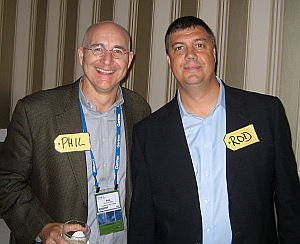
Last week Phil Gilbert and Rod Favaron, our President/CTO and Chairman/CEO respectively, held a call with analysts. Since Lombardi is a privately held company these weren’t financial analysts but rather industry analysts like Gartner, Ovum, the 451 group etc. That being said, the call which is usually held twice a year, is run very much the same way a traditional financial analyst call would be run for a public company.
Last week’s call, which was in addition to the normal semi-annual calls, was set up in order to address questions around the current economic downturn and what effects we may or may not be seeing.
Here are some highlights from the call that Sandy Kemsley noted in her blog
Lombardi continues to grow — 60% in license revenue and 40% overall — although their services business isn’t growing as fast as license sales since they are bringing on more partners to provide services rather than doing it all themselves, especially in geographies that they can’t cover well. They’ve increased their headcount by 25% and increased productivity (which allows them to grow revenues faster than headcount), and are in a profitable state for 2008. They believe that BPM will be counter-cyclical to the current economic crisis, and have the potential to grow in more difficult financial times due to a closer focus on ROI… (read more)
Morphis is a company that provides currency supply chain management software and counts among its customers the U.S. Federal reserve as well as central banks, ATMs and armored car companies around the world. Process mapping was the furthest thing from their minds when they started in business but they quickly found out that if they didn’t start leading their customers in process mapping sessions they wouldn’t be able to sell their product.
Last week I chatted with Gary Faulkner of Morphis about how they found themselves unexpectedly leading process mapping sessions for customers or, as Gary likes to describe the turn of events, “A funny thing happened on the way to the software business.”
Last but not least in the three podcasts I taped at the Rackspace Customer Event is my conversation with John Engates, Rackspace CTO. Like Lanham and Jonathan, John was a very approachable and likable guy. I checked out John’s presentation earlier in the day and then caught up with him in the afternoon to chat.
At the Rackspace Customer Event the week before last, I caught up with Mosso co-founder Jonathan Bryce. Jonathan walked me through how Mosso, now officially a Rackspace division, got started and where he sees it going.
Jonathan chillin’ in theBaroque Westin Riverwalk lobby.
Some of the Topics we tackle:
How while at Rackspace, Jonathan and a buddy moonlighted as web app developers and when they couldn’t find a place to host the apps and sites they developed, they got funding from Rackspace and created Mosso.
How Mosso was being founded as people were getting burned by the undelivered promises of Utility computing.
How Jonathan defines cloud computing (hint: it has three layers).
The characteristics and examples of IaaA, PaaS, SaaS and where Rackspace/Mosso plays.
The joy of 15 cents a GB per month storage that Mosso will be providing and which Blueprint will be leveraging in our next release.
The relationship between Rackspace and Mosso and why the Mosso site is so much cooler.
What role open source plays in the Cloud and Mosso.
Extra-credit
If you want to catch Jonathan live, he will be presenting at the Cloud Computing expo in San Jose November 19 – 21.
Last week I attended the Rackspace customer event down in San Antonio. On the first day of the event I was able to grab sometime with Rackspace’s CEO, Lanham Napier. We chatted about going public, the company’s recent acquisitions and its foray into the cloud via Mosso.
Rackspace’s two service sets, Managed Hosting and Cloud Hosting, and what’s the difference (Blueprint utilizes both)
Lanham’s thoughts on Microsoft’s Cloud announcement and the relationship between the two companies.
But wait, there’s more
Stay tuned, in the next few days I will be posting the other two podcasts I did last week, one with CTO John Engates as well as one with Mosso co-founder Jonathan Bryce.
Last week I attended the Rackspace Customer Event (Lombardi Blueprint is hosted at Rackspace) down on the Riverwalk in San Antonio. It was a great event and I sat in on some cool talks as well as grabbed some time with several of the Rackspace execs.
One of the talks I sat in on was CTO John Engates’ Cloud Computing presentation. You can check out the whole presentation here, but the section I wanted to call out was the one that dealt with “The Categories of Cloud Computing.” While not an original construct, it helped me to see it laid out like this:
Application Clouds (SaaS)
Ease of use: Low complexity
Flexibility: Minimal control
Typical Consumers: End users
Examples: Mail Trust, Salesfore.com, Blueprint, TurboTax Online, Microsoft Online Services
Platform Clouds (PaaS*)
Ease of use: Medium complexity
Flexibility: Medium control
Typical Consumers: Developers
Examples: Rackspace/Mosso Hosting Cloud, Google AppEngine, Force.com, Azure
Infrastructure Clouds (IaaS)
Ease of use: High complexity
Flexibility: Maximum control
Typical Customers: Developers, System Administrators
Examples: Rackspace/Mosso Cloud Files, EC2, S3, Microsoft SSDS, FlexiScale, GoGrid
While I find these categories helpful now, I’m sure it won’t be long until these divisions go the way of “intranet,” “extranet,” and “internet,” and there’s just one big happy cloud.
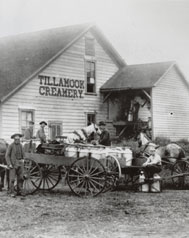
If you’re not familiar with the name, Tillamook is a 99 year-old cooperative made up of over 150 dairies that produces high-end dairy products. The award-winning cooperative, officially named the Tillamook County Creamery Association, is located up in the north west corner of Oregon.
Until recently, processes were passed down from artisan to artisan in the form of what Steve Burge, who runs TIllamooks’ Business Process Management Office, jokingly refers to as “tribal knowledge.”
There’s a new Sheriff in town and he’s a fan of BPM
When Tillamook’s new CEO came on board he realized that he needed to get a handle on the company’s processes in order to move forward and compete in today’s market. It was Steve’s job to put together a Process Management Model to lead the collection and documentation of the company’s processes.
Yesterday at PDC, the big Microsoft developer fest, Ray Ozzie got up and announced the beta launch of Windows Azure, Microsoft’s entry into the cloud computing arena. (It may be beta but you’ll notice they already have a snazzy logo)
This wasn’t a big surprise to anyone since they had been doing some saber-rattling in the past weeks about how they would be joining the party (fashionably late in true Microsoft style). To carry the party analogy a little bit further, two of the other guests who had gotten there early to help set up, Rackspace and Amazon, made announcements of their own last week. Rackspace announced the acquisition of two cloud-focused start-ups and a reorganization of their Coud division, Mosso. Amazon added Windows as an OS to EC2 (have a mentioned how much I dislike the “EC2” name?), dropped the “beta” tag it and added an SLA of 99.95% availability per year.
Looking at the Cloud from both sides now
In an interesting post from the BBC’s Rory Cellan-Jones, which is based on an interview that Rory conducted with Ozzie yesterday, Rory finds out they have slightly different interpretations of cloud computing (shocker!). Ozzie sees Amazon as a cloud pioneer but “[insisted] that Google just wasn’t in cloud computing.”
I pointed out that the one cloud application with which I was familiar was Google Docs … But it turned out we were looking at the cloud from different sides. Mr Ozzie was focussing on it as something you rented out to businesses so they could use the vast computing power in your data centres to create applications which could scale up in a hurry – an approach where Amazon is enjoying plenty of success. I was thinking of the cloud as a place where millions of users could store their data and use simple online programmes, mostly for free.
There are folks who agree with Ray that what Google does is deliver Software as a Service rather than cloud computing but I don’t think the distinction is helpful. To me if you draw on compute resources, be they apps or platforms, from a source you don’t own or manage and that you can scale up or down as needed and you are billed accordingly… that’s cloud computing. (I’m off to the Rackspace customer event today so it will be interesting to see if I come back with a different definition 😉
In keeping with the project naming schema of an alphabetical list of “bands-from-the-70’s-and-80’s-that-are-at-least-somewhat-cheesy” we are up to “P” and “Poison” (check-out the whole list here). Poison is the 11th public Blueprint release and the 16th overall (releases usually come out every 6-7 weeks).
What’s new to Poison:
User Management: Thanks to the magical properties of SaaS and improvements to Blueprint, the project leader, or whomever has the admin rights, can add users on the fly and reassign user accounts depending on activity level. If someone isn’t utilizing their account it can be reassigned to a new individual at the click of the mouse.
Invitations: Just like a social networking app like LinkedIn or Facebook, you can now send invites to colleagues to join Blueprint and collaborate on process discovery and documentation.
Instant Upgrades: If you have signed up for a Free account and want to upgrade to the Professional Edition, all you have to do is hit the “Upgrade Now!” button and you are good to go!
Printing Big and Small: Whereas before you printed out your process flow diagrams to plotter-sized sheets of paper, you now have the option of printing the full image as a composite across as many pages as needed, or even scale it to fit on one sheet.
Word Export of Process Documentation: We’ve improved the print out capability to Microsoft Word Documents. Now when you print from Documentation View all your inputs, outputs, problems and stakeholders are included.
Stay tuned for cool features the next release which is due in 6-7 weeks. And what is the code name of the next release you may ask? “Q” is the letter so it could only be “Quiet Riot.”
Rather than putting together a how-to-use-Blueprint course, we wanted to go broader and create a how-to-get-started with Process Mapping. What we’ve been hearing from a lot of our customers is that, while the Blueprint product is fairly straight forward, they are looking for a methodology on how to approach and drive process modeling project. They know it involves getting group of folks together in room and capturing the info but who do you invite? How do you run a session so you get what you want out of it and capture and come away with useful info? Whats the best way to communicate your progress and get buy-in from senior management?
Broken out into 5 segments of Flash video, the [2 hour] training provides a step by step approach to getting started with mapping your as-is process: the team members needed at each step, roles and responsibilities, how to facilitate the mapping sessions, how to drive the Blueprint tool, and how to organize the generated process diagram for maximum effectiveness. Much of it takes the form of simulated team mapping sessions. Most of the rest is hands-on for the student. We’ll describe a scenario of information gathered from the team session, and you’ll put it into Blueprint – training video in one browser window and Blueprint open in another, so you can compare your result with what it should look like. Hands-on exercises are the only way to learn it.
Who’s it targeted at?
Like Blueprint itselft, rather than process-jocks, this course is designed for Business Owners, Subject Matter Experts, Project Managers, and Business Analysts who are looking to get started with process mapping from a real-world perspective.
To get a flavor for the course, you can watch a few short snippets from the training here. Check it out!


 Posted by Barton George














 Barton's Blog