Dell’s Developer line turns 10 — Looking back at a Project Sputnik’s first decade

April 13, 2025

Originally published February 3, 2023

10 years ago, Dell’s first developer system, the Ubuntu-based XPS 13 developer edition became available in the US and Canada.  What made this product unique was not only that it had been developed out-of-process and by a team largely made up of volunteers, but it targeted a constituency completely new to Dell.  On top of that, nine months prior to launch the offering was nothing more than a recommendation supported by a handful of slides.
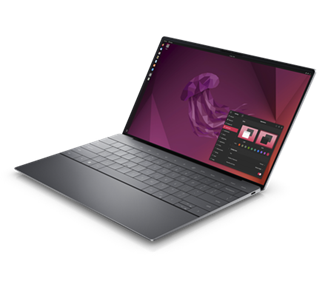
Today’s 12th generation Dell XPS Plus developer edition

Fast forward a decade and that initial developer edition is in now its 12th generation and has grown into an entire portfolio of developer systems.   In addition to the XPS 13 developer edition, this portfolio now includes the Linux-based Precision mobile and fixed workstations, targeted not only at developers but data scientists as well.

You may be wondering not only how this volunteer-driven effort, targeted at what was seen as a niche audience, has survived, and thrived over the last 10 years.  To learn this and what’s next for Dell and developers, read on….

We loved the idea! Unfortunately, we knew that our client group would never go for it.  The customer segments that Dell traditionally supported required huge volumes and a developer laptop would be seen as serving a “niche” market.  We filed the idea away under, “great but impractical.”

Hark, an innovation fund

A few months later however, providence shown in the form of a recently established innovation fund.  We realized that if we were ever to get support for our idea, this fund would be our best shot.  

In order to put together a realistic proposal we started by enlisting a couple of interested engineers to provide a technical perspective.  Next, we reached out to Canonical, the commercial sponsor behind Ubuntu, to gauge their interest (they were all in).   With the help of Canonical, our little team performed some back of the envelope calculations to determine the resources needed to deliver a developer laptop.  Based on our quick analysis we decided that it looked do-able and that we would worry about the details later.  

The pitch

The deck I ended up delivering to the innovation team was far from a typical Dell presentation.  The deck contained no numbers, no cost estimates and no revenue projections.  Instead, I described the influence that developers had in the IT buying process and explained that the goal of the program was not to make money* but to raise Dell’s visibility with an influential community.  By delivering a high-end Linux-based developer system, not only would we have something that no other major OEM offered, but more importantly it would help us to build trust within this community.  This in turn would not only benefit our client business but the broader Dell as well.  

  1. Involve the community
  2. Be transparent
  3. Contribute back

I finished my presentation and rather than a standing ovation the innovation team thanked me for my time and told me they’d get back to us.

*Note: the program has not only paid for itself but has delivered tens of millions of dollars in revenue

Don’t look stupid

A month later, on the Ides of March, we were contacted and told that we were being given 6 months and a little pot of money to prove the value and viability of a developer laptop.  We immediately formed an “official” core team and circled back with Canonical.  Together we dug in and began determining what was needed to ensure that, directly out of the box, Ubuntu would run flawlessly on the XPS 13.

At the same time, we needed to make doubly sure that if we went public the community wouldn’t see Dell as tone deaf and “not getting it.”  To help us determine this, we enlisted three local application developers, aka “alpha cosmonauts,” to act as sanity checkers and to provide early guidance. In parallel I headed to the west coast and met with both Google and Amazon and told them what we were proposing.  While neither company placed an order for 10,000 units, I wasn’t laughed out of the room.  Seeing this as a positive sign and with the support of our alpha cosmonauts, our team had the confidence to move forward.

Drivers, patches and contributing code

To ensure that Ubuntu works flawlessly on a Dell system, Dell, Canonical and device manufacturers need to work together.  The process starts when the device manufacturers write open source drivers, allowing their devices (eg wireless cards, trackpads etc) to work on a specific Dell laptop or workstation.   Next, to go from “works pretty well” to “just works“ these drivers need to be tweaked. 
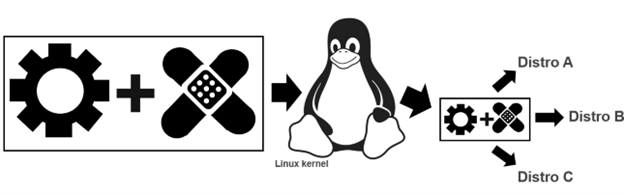
Tux attribution: gg3po, Iwan Gabovitch, GPL , via Wikimedia Commons

This tweaking comes in the form of open source patches which are jointly created by Dell and Canonical.  These patches are then added to the original driver code and all of which is contributed upstream to the mainline Linux kernel.  

While these drivers and corresponding patches are initially created to be used with Ubuntu, because code from the mainline kernel makes its way back downstream, all distros eg Fedora, OpenSuSE, Arch, Debian etc. can use it.  This sharing of the code gives the community the ability to run the distro of their choice beyond Ubuntu.

After a couple of frantic months of coding and patching together internal support, the team was ready to get public feedback. To reflect the project’s exploratory nature, rather than issuing a press release or posting an announcement on Dell’s corporate blog, we decided to post the announcement on my blog. 

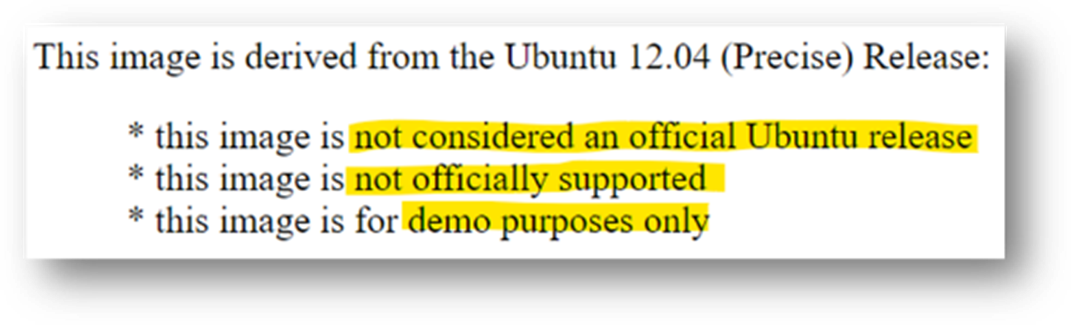
So that developers knew what they were getting into the OS image was clearly marked

We explained that the image was based on Ubuntu 12.04 LTS and came with a basic set of tools and utilities along with the requisite drivers/patches.  The exception being the touchpad driver which at that point didn’t provide full support and lacked, among other things, palm rejection.  This meant that if the user’s palm brushed the pad the cursor would leap across the page.  We clearly stated the issue explaining that we had contacted the vendor and in parallel we were working with Canonical to deliver an interim solution. 

Our ask of the community was to provide their feedback on the system, the OS and the overall project.  More specifically we wanted to know what they most wanted to see in a developer laptop.  

The response from the community

From there, interest kept growing and over the next few weeks we received global coverage from publications including The Wall Street Journal, Hacker News, Venture Beat, ZDNet, The Register, Forbes, USA Today, and Ars Technica.

Community input. 

When Project Sputnik was announced, developers were asked to tell us what they wanted in a Linux laptop.  Their requests were surprisingly modest.
Top 5 requests

  1. Don’t make it more expensive than Windows
  2. Make it work with the vanilla Ubuntu image
  3. At least 8GB of RAM
  4. No Windows Preinstalled
  5. No CD/DVD

Based on the response, along with the amount of input we received from the community, we quickly sketched out a beta program.  This turned out to be the tipping point.  We asked that anyone interested in participating in the program submit an online form.  We expected a few hundred responses, we got over 6,000. 

Hello world

This overwhelming response convinced senior management that the project was viable.  We were given the go ahead and four short months later the Dell XPS 13 developer edition debuted in the US and Canada.
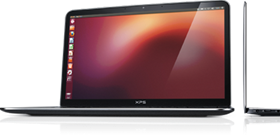
The 1st generation Dell XPS 13 developer edition. For this initial launch the team erred on the side of caution and offered only one configuration.  The config they chose was the highest available at the time: 3rd gen Intel core i7, 8GB RAM, 256GB SSD and a screen resolution of 1366×768.

At launch the product received more attention and coverage than our original announcement. There were however two complaints, the screen resolution was too low (1366×768), and the system wasn’t available outside the US and Canada.  We took this input to heart and two and a half months later we introduced a Full HD (FHD) display (1920 x 1080), and the XPS 13 developer edition debuted in Europe.

Going big with Precision

Something else we started hearing from a segment of the community was, although they liked the idea of a developer system, the svelte XPS 13 developer edition wasn’t powerful enough for their needs. They were looking for a bigger screen, more RAM and storage, and beefier processors.  The system they had their eye on was the Dell Precision 3800 mobile workstation.   Unfortunately, at that point our little team didn’t have the resources to enable and support an additional developer system.  Realizing this, team member Jared Dominguez, whose official job was on the server side of the house, took a 3800 home and got to work enabling Ubuntu on the mobile workstation.  Not only did Jared get the system up and running but he carefully documented the process and posted a step-by-step installation guide on Dell’s Tech blog.  People ate it up. 
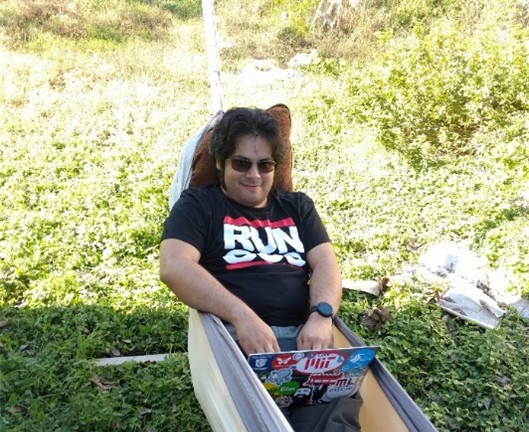
Jared hacking in his hammock
 How to get Ubuntu up and running on your Precision workstation

Instead of satisfying their desire for a more powerful system, Jared’s post only served to increase the demand for an officially price-listed offering. 

Community feedback in hand, the project Sputnik team took our learnings to the workstation group and convinced them of the opportunity.  The Precision team dug in and a year later the Ubuntu-based Dell M3800 Precision mobile workstation became available (virtually doubling Dell’s developer product line).  Not long after that, the developer portfolio more than doubled again when the Precision team expanded their mobile line up from one to four systems, each of which was available as a developer edition.

Today

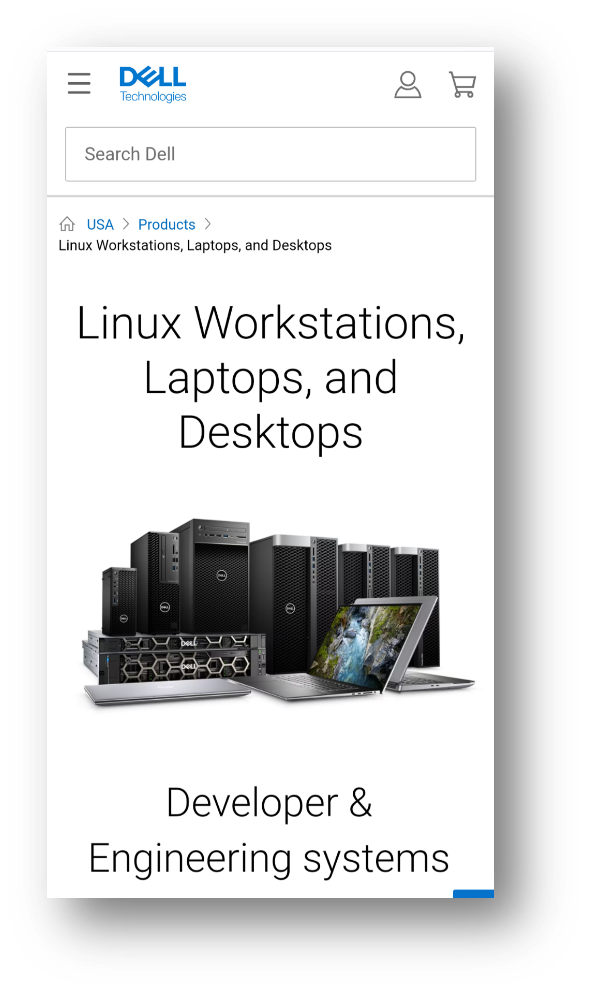
Today the Dell XPS 13 developer edition is in its 12th generation.  On the Precision side, the mobile workstation line is in its 8th generation and has been joined by the fixed workstation line.  Besides Ubuntu, both the fixed and mobile workstations are certified to run Red Hat and, in the case of the fixed systems, they are available from the factory with Red Hat preloaded.  Additionally, the Precision portfolio now contains both developer-targeted systems as well as Data Science and AI-ready workstations. 

And while Dell’s developer line is its most visible Linux-based offerings, these offerings make up only a fraction of the over 100 systems that comprise Dell’s broader Linux portfolio.

Not always a cake walk

Over the last 10 years, while the project has gone from a single product to a broad portfolio, the first years weren’t exactly smooth sailing.  While there were always a variety of individuals and teams who were willing to help out, there were also many who saw the effort as a waste of resources.  In fact, in the first few years the team found themselves more than once in the cross hairs of one department or another.  

When we reached the three-year mark, it looked like Project Sputnik had finally used up its nine lives.  Dell was looking to focus resources and planned to pare down across the board.  Given the previous few years it was no surprise when we were told it was almost certain that the developer line would not make the cut.  At that point I remember thinking, we’ve had a good run and can be proud of having made it as far as we did. 

We still don’t know what happened, but once again providence shown and, for some reason, the axe never fell.

Going forward

As we head into our next decade, we find ourselves in a different environment. Ten years ago, most Dell employees saw developers as a niche market at best, today that’s changed.   With the continuous rise of DevOps and platform engineering, the broader Dell has recognized the importance of developers alongside operations. 

In light of this, Dell’s overall product portfolio, from laptops, to server and storage solutions is now being designed with developers in mind.  To ensure that developers’ requirements are being accurately reflected, Dell has recently established a developer relations team and has brought in key figures from the community to serve as developer advocates.

In the case of the existing developer portfolio, besides looking for more opportunities to connect client systems to back-end systems, Dell is looking at various ways to broaden the portfolio on the client side.  The team is currently in the early stages of brainstorming and are looking at a variety of options.  Stay tuned!
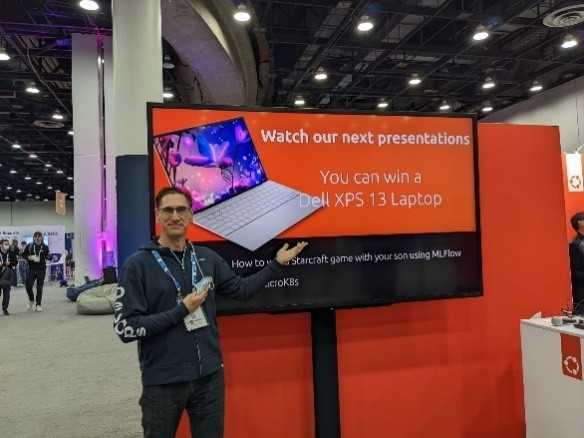
At Kubecon NA 2022 I came across the Dell XPS 13 Plus developer edition being offered as the grand prize at the Canonical booth

A few groups that need to be called out for making this possible:

A big thank you to Canonical who has worked hand in hand with us to deliver and expand our developer line and a shout out to those at Dell who, on top of their day jobs, have given their time and support.  Finally, a huge thank you the developer community for making project Sputnik a reality.  Over the last ten years you in the community have let us know what you’ve liked and where we could do better.  It’s because of this amazing support that not only are we still here 10 years later, but it looks like we’ll be around for awhile 😊

  1. Get a champion, be a champion – You need to have someone high up to go to bat for you at critical moments but on a day-to-day basis it’s you who must be a tireless champion
  2. Leverage, execute – It doesn’t matter if it’s your idea or not, delivery is what counts
  3. Start small – Don’t over promise, stay focused and err on the side of caution
  4. Communicate, communicate, communicateStay in constant contact with the community, speak directly and with empathy and when you screw up or fail to deliver, own it

Post Script – Why “Sputnik”?

You may be asking yourself, why did they name it “Sputnik” in the first place? The project name is a nod to Ubuntu founder and Canonical CEO, Mark Shuttleworth who, 10 years before the project itself, spent 8 days craft orbiting the earth in a Soviet space (while the ship was actually Soyuz, it didn’t have an inspiring ring to it so we went with “Sputnik” instead.)

Pau for now…


Touchpad Palm Detection – the “confidence” feature

October 5, 2015

More info from the tech team:

The XPS 13 9343 utilizes the Microsoft Precision Touchpad specification in I2C mode. The specific feature within the Microsoft Precision Touchpad specification is the “Confidence” feature:

Confidence

Confidence is used to indicate that the contact does not have any dimensions (height or width) > 25mm that implies that it is not an unintended contact. Windows Precision Touchpads should not reject any contacts in firmware processing, but should forward all contacts to the host and indicate the confidence. After a device has deemed a contact to be unintentional, it shall clear the confidence bit for that contact report and all subsequent reports. Until a contact has been deemed unintentional, the device shall set the confidence bit for that contact being reported.

With that feature correctly implemented, palm rejection in I2C mode should work.

Driver feature development is something we work with our vendors on ensuring they develop, though in this case they won’t since the Microsoft Precision Touchpad specification is a feature that falls outside of vendor-specific needs. Synaptics (or any other touchpad vendor) is unlikely to implement this feature in the Linux i2c_hid driver because it’s not vendor-specific but instead a Microsoft specification.

Microsoft Precision Touchpad specification:

https://msdn.microsoft.com/en-us/library/windows/hardware/dn467314%28v=vs.85%29.aspx

HTH

Pau for now…


Kernel panics when switching wireless networks — XPS 13 developer edition 9343

September 1, 2015

In addition to the recent fixes I posted for the XPS 13 developer edition, here is one more from the team.

thanks

Broadcom bug

Some customers may experience an issue where their system crashes when switching wireless networks while running the factory install of Ubuntu 14.04. The issue appears to be a bug within the Broadcom wireless driver. You can follow the bug report at the following link:

https://bugs.launchpad.net/ubuntu/+source/bcmwl/+bug/1415880

The current recommended fix is to add the PPA at the following link to your repository list and then update your system to apply the fix:

https://launchpad.net/~inaddy/+archive/ubuntu/lp1415880

There are two methods to apply the patch detailed below:

Method 1

Run the following command to add the repositories using your package manager:

sudo add-apt-repository ppa:inaddy/lp1415880

Method 2

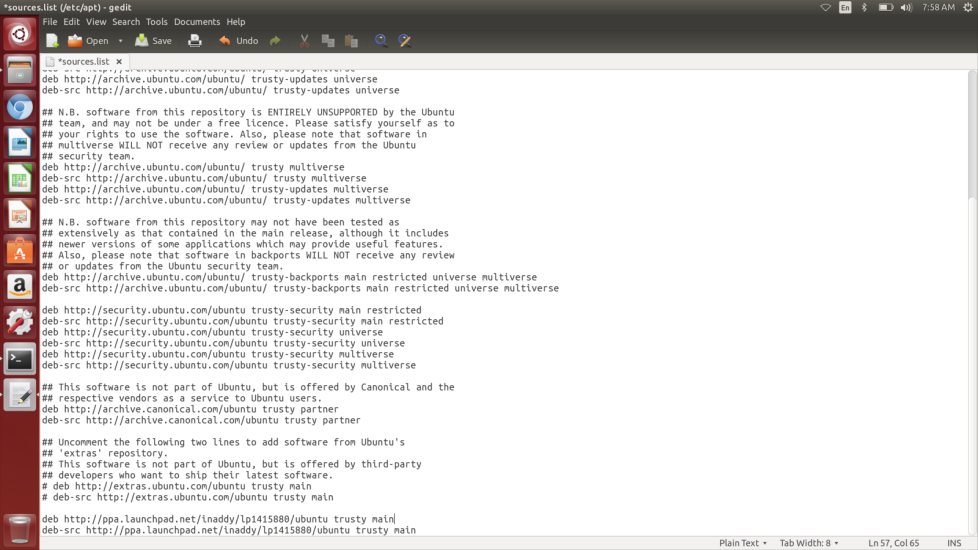
You can also add the repositories to your /etc/apt/sources.list file manually. Just add the following lines to the end of the sources.list file as in the screenshot below (requires root access).

deb http://ppa.launchpad.net/inaddy/lp1415880/ubuntu trusty main

deb-src http://ppa.launchpad.net/inaddy/lp1415880/ubuntu trusty main

After the repositories are added then update your system by running the following command:

sudo apt-get update && sudo apt-get upgrade

Kernel Panics

Extra credit reading

Pau for now…


Meet the project Sputnik team + Case Study

July 29, 2015

The other day Canonical came to Dell for a show and tell.  The Sputnik team, normally located in various buildings in Austin and Round Rock, all found ourselves in attendance at the event.  Here is a quick meet-the-team video introducing ourselves, saying where we’re from and declaring our favorite TV show.

Additionally,  here is a short case study giving the Project Sputnik history.

Pau for now…


XPS 13 developer edition on pause

July 20, 2015

We are aware of some issues that need to be addressed with our XPS 13 developer edition.  While patches have been made available (or coming soon), we are working to add these fixes to the systems at the factory.

Given that we want our customers to have the best experience possible, we have temporarily stopped new sales of the XPS 13 developer edition. Our desire is to bring back the system as soon as possible, but only after we have resolved the outstanding issues at the factory level. [Please realize that this DOES NOT AFFECT the windows version of the XPS 13]

We apologize for the inconvenience and thank you for your support and patience.

Reference

Pau for now…


Updated Developer Edition Knowledge base: XPS 13 and M3800

July 15, 2015

Once again we want to thank the entire community for your posts containing feedback and questions to the Dell TechCenter forum and this blog regarding the Ubuntu-based XPS 13 and M3800 developer editions.

Last month we posted links to four knowledge base articles addressing:  wireless drivers, keyboard repeat, suspend/resume and cursor freezes.   Today we are adding three more that have been hot topics recently: creating recovery media, OOBE crashing, and 15.04 UEFI install.  So we have all the articles in one place I have also included the previous ones below.

Knowledge Base links:

How to create recovery media for the XPS 13 9343 and Precision M3800 Developer Editions:

http://www.dell.com/support/article/us/en/19/HOW10851/en

Dell-Recovery Utility May Crash During Out of Box Experience:

http://www.dell.com/support/article/us/en/19/SLN298209/en

How to install Ubuntu on a Dell XPS 13 (9343) developer edition configured for UEFI:

http://www.dell.com/support/article/us/en/04/SLN297060/en

Trackpad cursor freezing issue:

http://www.dell.com/support/article/us/en/19/SLN297219/EN

May not resume from suspend running 14.04:

http://www.dell.com/support/article/us/en/04/SLN297551/en

Unwanted keyboard character repeat

http://www.dell.com/support/article/us/en/19/SLN297563/en

How to Install Broadcom Wireless Driver on XPS 13 9343 from Ubuntu 15.04 Install Media:

http://www.dell.com/support/article/uk/en/ukbsdt1/HOW10806/en

Leverage your support contracts

Remember, in addition to posting your feedback here, we encourage customers to utilize their support contracts and contact the included Dell support (either Consumer Support or ProSupport, depending on whether you purchased it from the Consumer or Small Business sections).  This will help us to officially track issues and tackle them systematically.

How to reach ProSupport:

Please continue to give us your feedback on the Developer Edition systems.

Pau for now…


Value Ubuntu systems available for consumers in US along with high end XPS 13 developer edition

June 8, 2015

In the last few weeks Dell has expanded its consumer line up with additional Ubuntu machines:  both the economical Inspiron series as well as the high-end, XPS 13 developer edition.

The new economical Ubuntu laptops are made up the Inspiron 14 Inspiron 14 3000 Series Laptop Ubuntu Edition3000 and Inspiron 15 3000 (14 & 15 denote the screen size) which each offer four configs.  All configs of both the 14 and 15 are non-touch.

Here are the specs:

Inspiron 14 3000 + Ubuntu 14.04 SP1

  • Celeron/2GB/500GB: $219.99
  • Celeron/2GB/500GB + optical drive from SAPP: $259.99
  • Pentium/4GB/500GB: $279.99
  • Pentium/4GB/500GB + 2 year mail in service (the above all come with 1 year mail in service): $329.99

Inspiron 15 3000 + Ubuntu 14.04 SP1

  • Celeron/4GB/500GB: $249
  • Celeron/4GB/500GB + optical drive from SAPP: $279.99
  • Pentium 4GB/500GB: $279.99
  • Pentium/4GB/500GB + 2 year mail in service (the above all come with 1 year mail in service): $349.99

XPS 13 developer edition

The smallest 13-inch on the planet with the worldThe XPS 13 developer edition, which in the states has been available only to businesses, is now available to consumers as well.  The four consumer configs are a bit different than those in business:


Check them out, you may find one just right for you.

Pau for now…


Developer Edition Knowledge base: XPS 13 and M3800

June 2, 2015

Update June 26:  How to Install Broadcom Wireless Driver on XPS 13 9343 from Ubuntu 15.04 Install Media

http://www.dell.com/support/article/uk/en/ukbsdt1/HOW10806/en

================================

We want to thank the entire community for your posts containing feedback and questions to the Dell TechCenter forum and on this blog regarding the XPS 13 and M3800 developer editions (Ubuntu).

In response to your feedback, here are the first three Knowledge Base articles focusing on the hottest issues.  This post and the Knowledge Base will be updated if new issues crop up.

  • Trackpad cursor freezing issue:

http://www.dell.com/support/article/SLN297219/en [to be promoted to the Dell archive hosted by Canonical – stay tuned].

  • May not resume from suspend running 14.04:

http://www.dell.com/support/article/SLN297551/en

  • Unwanted keyboard character repeat

http://www.dell.com/support/article/SLN297563/en

Remember, in addition to posting your feedback here, we encourage customers to utilize their support contracts and contact the included Dell support (either Consumer Support or ProSupport, depending on whether you purchased it from the Consumer or Small Business sections).  This will help us to officially track issues and tackle them systematically.

Please continue to give us your feedback on the Developer Edition systems.

June 3, update: How to reach ProSupport:


Thanks!

The Dell Sputnik team


Update: Dell XPS 13 laptop, developer edition – Sputnik Gen 4

February 5, 2015

We have been getting a ton of questions around the 4th generation Sputnik (XPS13 Sputnik_Sticker_Finallaptop, developer edition) and when it will be available.  As you may have seen, last week at Sundance we broke the news of our brand new Dell Precision M3800, developer edition pre-loaded with Ubuntu.

The XPS 13 isn’t far behind. We’re getting close and will have more to share soon but ultimately are spending time making sure everything works to provide the best customer experience possible.  A word of caution, if you purchase the Windows version of the new XPS 13 and try to load Ubuntu on it you will run into a few issues that we are currently addressing.

Please realize this DOES NOT AFFECT the Windows version of the XPS 13 laptop that recently launched.

Stay tuned for more updates soon.

The Reviews are in

XPS 13:  For your reference here are just a handful of awesome reviews that the Windows version of the recently launched XPS 13 laptop has garnered.  (The developer edition is based off this.)

  • Dell’s New XPS 13 Laptop Makes Me Seriously Regret My MacBook Air Purchase – Forbes
  • The MacBook Air Meets its Match – Wall Street Journal
  • Stunning screen, compact design make XPS 13 the first great laptop of 2015 – CNET
  • Dell’s Gorgeous New Windows Laptop Has An Amazing Screen And Is Cheaper Than The MacBook Air – Business Insider
  • Dell puts Apple’s MacBook Air on notice at CES – FOX News
  • Dell XPS 13 Boasts Thinnest Screen Bezel Ever – LAPTOP Mag
  • Dell’s New XPS 13 Sounds Like The Laptop Of My Dreams – Gizmodo

M3800 developer edition: Also for your reference, here is a bit of the press coverage the M3800  developer edition received

Extra-credit reading


Pau for now…


Welcome the Dell Precision M3800 mobile workstation, developer edition

January 27, 2015

Update March 17:  Great  review in Network World — Review: Dell’s Ubuntu-powered M3800 Mobile Workstation is a desktop destroyer

Since the planning stages of project Sputnik over two years ago we wanted to offer two versions of our developer-focused systems.  The idea was to have both an ultra mobile laptop and a beefier workstation offering, a beauty and the beast line up if you will.  Due to the need to focus our resources however, we worked with the community to first build out the laptop, delivering the XPS 13 laptop, developer edition.Soyuz

Moving towards the beast

The first year after launching the XPS 13, we got a steady stream of requests for a bigger system.  This wasn’t lost on team member Jared Dominguez who decided to work on his own time with the Dell Precision M3800 mobile edition and put together instructions on how get Ubuntu running on the system.

A little over a year ago with the launch of the 3rd generation of the XPS13 developer edition we also announced its “unofficial big brother” and provided Jared’s instructions.  We received a lot of great feedback but there were also folks asking when we were going to deliver an officially supported version of the M3800.  What we told the community was — like the initial project Sputnik offering, if we got enough positive feedback — we might be able to offer it as an official pre-installed system.

A thread was started on the Sputnik Forum for people to express their interest in an official system.  We got a tremendous amount of positive feedback and as a result we listened to our customers and have added the M3800 to our developer edition lineup of Ubuntu-based systems.

Introducing the Dell Precision M3800 mobile workstation, Developer Edition

One of the main features people were looking for in the Precision M3800 was 16 GB of RAM.  The new Ubuntu-based M3800 introduced today, has that and a whole lot more:

Dell Precision M3800 mobile workstation, dev edition – Key features

  • Preloaded Ubuntu 14.04 LTS
  • Next generation of the world’s thinnest and lightest true 15-inch mobile workstation
  • Starting weight of just 4.15lbs (1.88kg) and a form factor that is less than 0.71 inches (18mm) thick
  • Fourth generation Intel Core i7 quad-core processor, professional grade NVIDIA Quadro K1100M graphics, and up to 16GB of memory
  • 4K Ultra HD (3840×2160) screen option
  • Availability: worldwide

Unfortunately, one of the features that wont be available right out of the gate is thunderbolt support.  As Jared explains in his blog:

Because our factory Ubuntu installs only ship Ubuntu LTS releases, we were not able to ship with Thunderbolt support. However, thanks to the hardware-enablement stack in Ubuntu, starting with upcoming Ubuntu 14.04.2, you will be able to upgrade your kernel to add some Thunderbolt support. We plan to be working with Canonical to recertify the Precision M3800 with official Thunderbolt support.

How do I get one

You can get to the M3800 developer edition by going to the Dell Precision M3800 Mobile Workstation page: www.dell.com/create and choosing the system labeled “Fully Customizable” on the far left.  Or you can go directly to configurator, where under “Operating System” you can select Ubuntu 14.04 SP1 and away you go!

M3800Menu

What about the additional software?

This time around we went with the vanilla image of the most recent LTS release (14.04).  A vanilla image was actually one of the top requests when we gathered input on our initial Storm session.

Since the original launch we have been working on a profile tool and Cloud launcher.  We are still working on these but it’s been a bit more difficult than we originally thought :).  Stay tuned for more news on this.

Will there be a new XPS 13 developer edition?

You bet!  The 4th generation of the XPS 13 laptop, developer edition will be available soon.  It will based on the the new XPS 13 laptop that debuted earlier this month.

A Big Thanks

Thanks to everyone in the community for the tremendous support of the Sputnik program.  Without your support, this program would not be possible!

 Extra-credit reading

Pau for now…


Developers share experiences running Ubuntu on Dell M3800 and XPS 15

May 12, 2014

Back in November when we  launched Sputnik 3, we also announced its “unofficial big brother,” the Dell M3800 Precision workstation and the Dell XPS 15.  This announcement was based on the after-hours work that Dell Linux engineer Jared Dominguez did to test and document the system.

Quite a few developers have referenced Jared’s work, taken the plunge and installed Ubuntu on these beefier systems.

M3800 Precision workstation

Here is a video that Rudy Vissers from Belgium created last month.  Rudy walks us through his new M3800 Precision including touchscreen and graphics.

XPS 15 laptop

Web developer Matt Woodward, who is a Principal IT Specialist for the US Senate and one of the original Project Sputnik beta cosmonauts, decided on upgrading to the XPS 15.  He shared his experience running Ubuntu on the XPS 15 on his blog earlier this month.  Here is an excerpt:

…Once Ubuntu is installed everything works out of the box. The screen runs at the full, mind-blowing 3200×1800 resolution, and even the touch screen works. No issues with sound card, WiFi, or anything else. Awesome…

If you need something a bit bigger and beefier than the XPS 13 developer edition, you just may want to check out either the M3800 or XPS 15.

If you’d like to see these as official products that come with Ubuntu pre-installed add your voice here:  Gathering interest on official Ubuntu support for Precision M3800  No promises but who knows!

Extra-credit reading

Pau for now…


Sputnik 3 — Great Reviews from the Blog-o-sphere

January 29, 2014

At the end of last year we launched the third generation of the Dell XPS 13 Developer Edition, aka Sputnik 3, which features the 4th generation Intel processors.  This Ubuntu-based laptop is the third in a line of developer focused systems which began life as the internal skunk works effort, “Project Sputnik.”  Thanks to strong community input and support the project became a product a little over a year ago.

Over this past month there have been three great reviews that have come out that I wanted to share.

1) Dell XPS 13 Developer Edition review (Haswell, late 2013 model)

This first review, from J’s blog, is quite detailed and comprehensive.   It has great photos and got nice traction on Hacker News.  Here is the opening paragraph

The XPS 13 Developer Edition, aka “Project Sputnik”, is a laptop with a FullHD 13-inch screen, backlit keyboard, SSD, 4th gen intel CPU and comes pre-installed with Ubuntu 12.04 LTS.

What makes this machine so interesting is not so much that Ubuntu comes pre-installed on it (it would be easy for anybody to install it him/herself, after all), but rather that Dell put some extra-work in making sure everything works right out of the box and supports running Ubuntu on it. WiFi, keyboard backlight, screen brightness control, sleepmode, etc. are guaranteed to work. [read more]

2) Guide to Leaving Your Mac Laptop

Carin Meier not only reviewed the XPS 13 developer edition but walks folks who may be interested in leaving their Macs behind how she set up her programs that she uses on a daily basis.  This blog too has great pics.  Carin’s blog starts,

I felt like I was in a controlling relationship headed downhill. After two custom laptops returned for defective hardware, I wanted to leave. But leaving didn’t seem so easy after living in the walled garden of Apple all those years.
This blog post is about how to leave your Mac and return to OSS.

There are quite a few nice alternatives to the Mac Air out there. I decided to go with the new Sputnik 3. Some of my reasons:

  • Powerful – New Haswell processor
  • 13.3 inch touch display with 1920 x 1080 resolution
  • Ships with Ubuntu 12.04 (64 bit)
  • Nice design (yes looks are important) [Read more]

3) Got me a Dell XPS 13 Developer Edition

The third review, by David Pollack, is actually a twofer in that he posted a follow on entry,  Still Liking the XPS 13 Developer Edition, two weeks after the first.  David’s posts are succinct and well laid out and I love his concluding paragraph 🙂

Just buy one

If you’re doing development like Clojure and Java, then the XPS 13 Developer Edition is a better choice than the MacBook Pro. It’s less expensive and just as impressive hardware-wise. And I like Linux a lot more than OS X. [Read more]

Extra-credit reading

Pau for now…


Sputnik 3 online in Europe just in time for Holidays

December 20, 2013

Last month in the States we announced the availability of Sputnik 3, the XPS 13 XPS13-DEDeveloper Edition featuring the 4th generation Intel processors. This laptop, which is touch-enabled, is replacing the existing XPS 13 Developer Edition.

We had hoped to make the offering available online across Europe a couple of weeks about but a few online glitches kept us from making it so.

Various countries have been coming online recently and today I would like to announce that the XPS 13 developer edition is available (see below for the specs) in the following countries/languages:

Sputnik 3  (XPS 13 Developer Edition) Product specs :

  • Processor: 4th generation Intel i7
  • Display: 13.3″ Full High Definition touch display (1080p)
  • System memory: 8GB
  • Graphics: Intel HD graphics 4440 (HD 5000 in the case of the enterprise version)
  • Hard drive: 256GB SSD drive
  • Standard Service: 1 year Dell ProSupport and onsite service after remote diagnostics
  • Operating system: Ubuntu 12.04 LTS
  • Community projects: Cloud launcher and Profile tool (for more info see the update from last week)

Thanks for your patience and happy holidays!

Extra-credit reading

Pau for now…


Project Sputnik Profile Tool: Dell commits engineering resources, Docker joins the cause and we want your input!

November 12, 2013

Sputnik_Sticker_FinalWhen we first introduced Project Sputnik over a year ago we talked about two community projects: the profile tool and the cloud launcher.  We garnered a fair amount of attention and made some progress but unfortunately not as much as I would have liked.  I am very happy to report therefore that recently we have put together an intrepid group of developers and architects within Dell to pick up the profile tool charge.

While we’ve had a few false starts in the past, besides the addition of committed Dell resources, there are a couple of other things that set this time apart: 1) we are starting from an internal use case and 2) we are working with and leveraging some of the work of Docker.

And just like when project Sputnik originally kicked off, we want to get your input and feedback on the Profile Tool and its direction (see a few paragraphs down for what specifically we are looking to you all for).

Internal need

Scratching your own itch is a key component to any self-respecting open source project. Read on to see where ours came in. A group within the Enstratius team, which we acquired back in the Spring, is switching to Sputniks (Dell XPS 13 developer edition) as their primary laptop. One thing that team member John Vincent was tasked with doing was getting these new systems set up quickly for the team. He was looking for a way to automate the process when his boss suggested he check out what we were hoping to do with the profile tool.  John liked what he saw so much that he joined the team.

Besides this representation from the Enstratius team, the Sputnik team also includes members from Dell Services’ office of the CTO and the Dell Cloud Services development and architecture team.

Working with the Docker crew

DockerRather than re-inventing the wheel, and to help provide perspective, we are now working with the folks from Docker.  They will be giving us their feedback, helping with integration and creating a Go profile.

As their CEO Ben Golub said, “The Dell team has delivered real benefits for the developer community through Project Sputnik and we expect same from the profile tool. We’re committed to working with their team to provide the best possible integration with Docker so those benefits continue to grow.”

Profile tool: Some details and a quick POC

The idea behind the profile tool is to enable a developer to quickly set up an environment without cluttering up their system.  This applies whether it is a “clean” computer for a new hire or a new project for an existing team member where the developer needs to use a new language or tool-chain.

A profile is basically a collection of simple YAML files, stored in a pre-determined directory structure, which specify one or more of the following:

  • Language:  a programming language e.g. Python, Ruby, JavaScript
  • Framework:  a language-specific software platform which simplifies the programming task (e.g. Django, Rails, Node.js)
  • Library:  an additional software component, such jinja2 or numpy for Python
  • Service: a software service used by the project, such as a database or message queue

To use a profile, it is downloaded to the developer’s machine, and an isolated environment (Linux container) is automatically created using Docker if it is part of the profile.

Input from the community

Here is the Profile Tool repository on Github and to give you a feel for how the profile tool might work, here is a quick POC (note that these actions aren’t actually being executed. We’re just logging them as if we were).

We would love to get your input. Some of the different ways you can contribute are as follows:

  • Open issues on this repository with suggestions on proposed definition syntax
  • Fork the repository and propose your own definition for a language
  • Share this initiative with your respective communities
  • Offer insight into how your community or company can use this
  • Be honest and tell us what works and what doesn’t

While almost everything is open to modification, we have a few small requirements.

  • The definition format MUST be YAML. YAML was chosen because it allows the appropriate data structures, is both human- and machine-readable and allows comments
  • Respect the goals of minimalism and composition defined above
  • This is based on Ubuntu 12.04 amd64 (for now) as the primary use case is for inclusion in the Sputnik laptop

We will be soliciting feedback for the next three weeks so please get us your thoughts by December 3.

What about the cloud tool?

We haven’t forgotten about the cloud tool, which allows you to deploy your applications to the cloud.  While you can currently use Linux containers and JuJu to get your apps into the clouds, we are working on a version that will provide even greater automation.  This will be phase II after we get the profile tool a bit further along, stay tuned!

But wait, there’s more…

If you’re interested in Project Sputnik you’ll want to watch this blog which will be bringing some more news in the not too distant future. 🙂

Extra-credit reading

Pau for now…


Shuttleworth raves about Dell XPS13 developer edition

May 24, 2013

At the OpenStack summit last month we caught up with Ubuntu and Canonical founder Mark Shuttleworth.

Below is a quick snippet taken from our chat with Mark where he talks about the Dell XPS 13 developer edition aka Project Sputnik.  Mark dubs the system “freakin’ awesome” and the “environment of choice for anyone doing web or cloud development.”  🙂

Extra-credit reading

  • Laptop Week Review: The Dell XPS 13 Developers Edition With Ubuntu – TechCrunch
  •  It just works: Dell XPS 13 Developer Edition Linux Ultrabook review – Ars Technica

Talking OpenStack, DevOps and Project Sputnik at the OpenStack Summit

April 25, 2013

Last week Dell’s cloud group was out in force at the OpenStack Summit in Portland, Oregon.  Its amazing to see how the event has grown since the first design summit back in July of 2010.

I got to catch up with a bunch of people, and attend a few sessions and some parties.  I also got to spend a fair amount of time in our booth and was impressed by the amount of interest we had in the XPS 13 developer edition.

Near the end of the first day I joined John Furrier and Jeff Frick in the Cube for a chat.  We talked about the growth of OpenStack, DevOps and Project Sputnik.

Extra-Credit reading

Pau for now…


Available online in Europe, the Dell XPS 13 Developer Edition

March 1, 2013

Last week we announced the arrival of the 1080p version of the XPS 13 developer edition, code name Sputnik 2.  At that time the system was available online in the US and Canada and from Dell reps in Europe.  Today the system is available online in the following European countries:

  • Austria, Belgium, Denmark, France, Germany, Ireland, Italy, Netherlands, Spain, Sweden, Switzerland and the UK (see below for the links to the individual product pages).  Norway will be coming online next week.

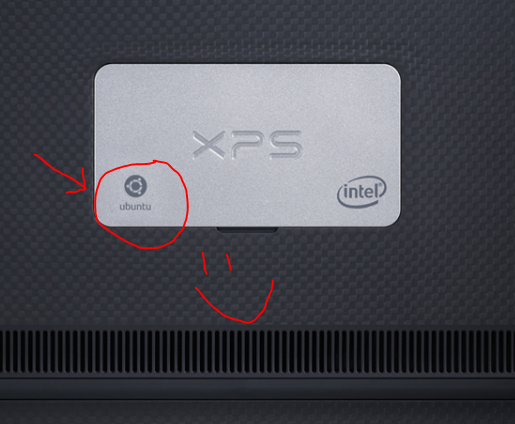
The Ubuntu logo graces the base plate of the XPS 13 developer edition

The Ubuntu logo graces the base plate of the XPS 13 developer edition

Product pages for XPS 13 developer edition by country/language

Available by calling Dell

In the following three countries you get your hands on an XPS 13 developer edition by calling your local Dell office:

  • Finland +358 (0)207 533 533
  • Luxembourg +352 26 30 47 1
  • Poland +48 22 579 59 99

Working on

We are currently working out a strategy to try and support the following countries.  Stay tuned for updates.

  • Israel
  • Morocco
  • Russia
  • Saudi Arabia
  • South Africa
  • Turkey
  • UAE

With regards to the Asia Pacific region, we currently do not have plans to introduce the XPS 13 developer edition in that region.  We continuously listen for customer feedback and demand and will reevaluate accordingly.

Extra-credit reading

Pau for now…


XPS 13 Developer Edition: Specsheet and a short overview

February 20, 2013

On Monday, we announced the new 1080p display for the XPS 13 developer edition and its upcoming availability in Europe and beyond.   To support that launch, here is the official spec sheet as well as a brief presentation on the project and resulting product.

Stay tuned for more news.

Pau for now…


Intel and ARM systems in same chassis and managed remotely

January 21, 2013

Last week I was out in the Bay Area attending the Open Compute (OCP) Summit.  The event was packed and full of energy.  My employer Dell was a platinum sponsor and we were showing off  some pretty cool stuff:

At today’s Open Compute Summit in Santa Clara, California, Dell showed off a new generation of X-Gene 64-bit ARM-based servers that the company is developing for data center customers. It also demonstrated new management software based on Open Compute Project standards allowing remote control of both Intel and ARM-based servers. The software and server designs Dell demonstrated would allow Intel and ARM-based systems to run in the same chassis. – Ars Technica

Here is the schematic of the management system (check out the client running the ipmitool 🙂

OCPremonteManagement

As part of the first day plenary sessions, Dell VP and Senior Fellow Jimmy Pike gave a brief historical overview of computing and management, leading up to the above solution.

The next Open Compute Summit will be in Vegas in the fall.  Look for us there.

Extra credit reading

Pau for now…


Emerging cloud solutions and driving innovation at Dell

January 17, 2013

Here is the second interview I did from the floor of  Dell World.  I talk about the following three topics:

  1. The Web vertical – understanding and meeting the needs of web companies
  2. [1:20]  The 4 emerging cloud solutions we were showing at Dell world
  3. [2:25] How Dell is  promoting innovation internally

Check it out:

Extra-credit reading:

Pau for now…