You Can’t Build an AI Strategy Without a Data Strategy

August 15, 2025

At their foundation, AI systems are massive data engines. Training, deploying, and operating AI models requires handling enormous datasets—and the speed at which data moves between storage and compute can make or break performance. In many organizations, this data movement becomes the biggest constraint. Even with better algorithms, companies frequently point to limitations in data infrastructure as the top barrier to AI success.

During the recent AI Infrastructure Field Day, Solidigm—a maker of high-performance SSDs built for AI workloads—shared how data travels through an AI training workflow and why storage plays an equally important role as compute. Their central point: AI training succeeds when storage and memory work in sync, keeping GPUs fully fed with data. Since high-bandwidth memory (HBM) can’t store entire datasets, orchestrating the flow between storage and memory is essential.

The takeaway: Well-designed storage architecture ensures GPUs can run at peak capacity, provided data arrives quickly and efficiently.


Raw Data → Data Preparation

Raw Data Set
The process begins with large volumes of unstructured data written to disk, usually on network-attached storage (NAS) systems optimized for density and energy efficiency.

Data Prep 1
Batches of raw data are pulled into compute server memory, where the CPU performs ETL (Extract, Transform, Load) to clean and normalize the information.

Data Prep 2
The cleaned dataset is then stored back on disk and also streamed to the machine learning algorithm running on GPUs.


Training → Archiving

Training
From a data perspective, training generates two outputs:

  1. The completed model, written first to memory and then saved to disk.
  2. Multiple “checkpoints” saved during training to enable recovery from failures—these are often written directly to disk.

Archive
Once training is complete, key datasets and outputs are archived in network storage for long-term retention, audits, or reuse.


NVIDIA GPUDirect Storage

A noteworthy technology in this process is NVIDIA GPUDirect Storage, which establishes a direct transfer path from SSDs to GPU memory. This bypasses the CPU and system memory, reducing latency and improving throughput.


Final Thought

While having more data can lead to better model accuracy, efficiently managing that data is just as important. Storage architecture decisions directly impact both performance and power usage—making them a critical part of any serious AI strategy.


Extra-credit reading:

Pau for now…


Why Storage Matters in Every Stage of the AI Pipeline

June 13, 2025

One of the companies that impressed me at AI Infrastructure Field Days was Solidigm. Solidigm, which was spun out of Intel’s storage and memory group, is a manufacturer of high-performance solid-state drives (SSDs) optimized for AI and data-intensive workloads.  What I particularly appreciated about Solidigm’s presentation was, rather than diving directly into speeds and feeds, they started by providing us with a broader context.  They spent the first part of the presentation orientating us and explaining the role storage plays and what to consider when building out an AI environment. They started by walking us through the AI data pipeline: (for the TL;DR see “My Takeaways” at the bottom)

Breaking down the AI Data Pipeline

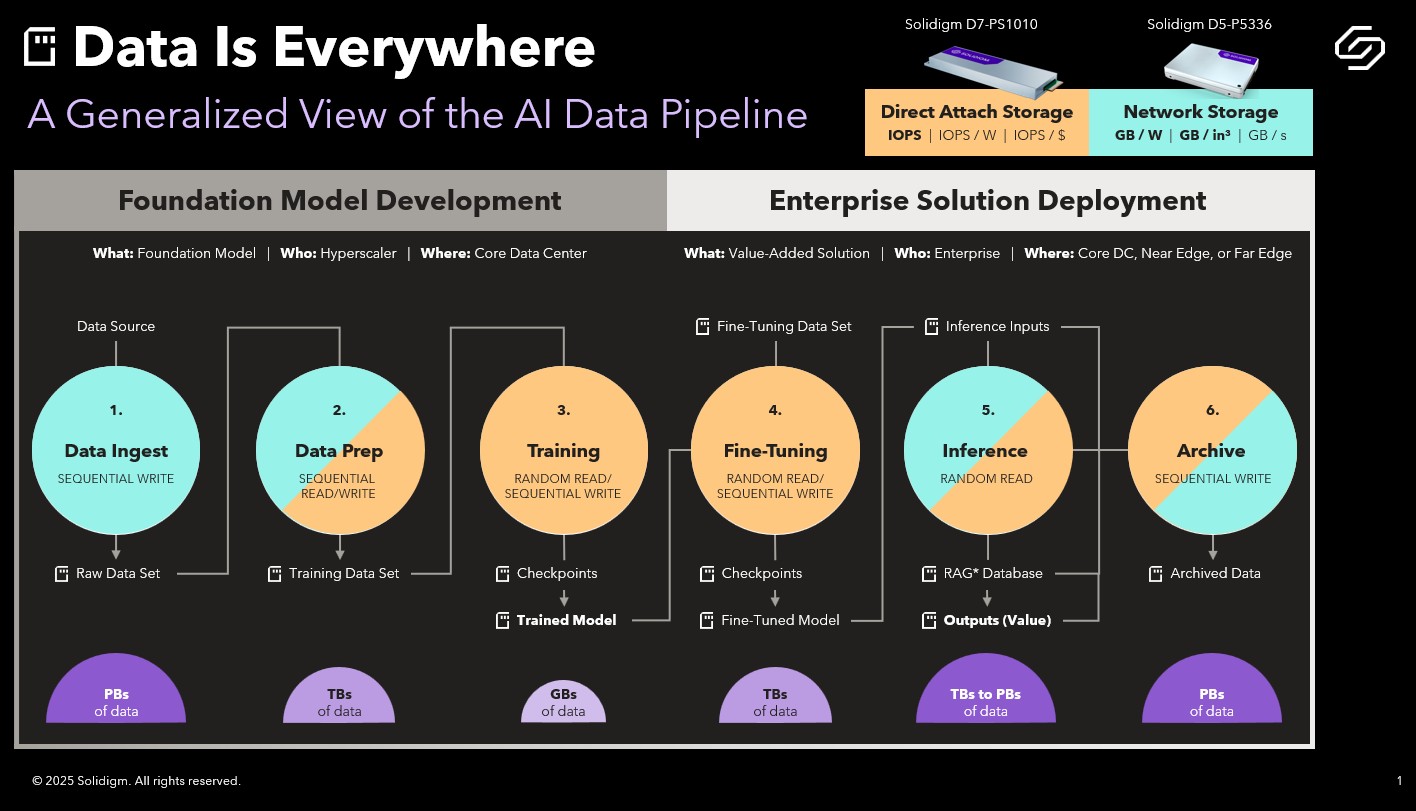
Solidigm’s Ace Stryker kicked off their presentation by breaking the AI data pipeline into two phases: Foundation Model Development on the front end and Enterprise Solution Deployment on the back end. Each of these phases is then made up of three discrete stages.

Phase I: Foundation Model Development. 

The development of foundation models is usually done by a hyper-scaler working in a huge data center.  Ace defined foundation models as typically being LLMs, Recommendation Engines, Chatbots, Natural Language Processing, Classifiers and Computer Vision.  Within foundation model development phase, raw data is ingested, prepped and then used to train the model. The discreet steps are:

1. Data Ingest: Raw, unstructured data is written to disk.

2. Data Preparation: Data is cleaned and vectorized to prepare it for training.

3. Training: Structured data is fed into ML algorithms to produce a base (foundation) model.

Phase II: Enterprise Solution Deployment

As the name implies, phase II takes place inside the enterprise whether that’s in the core data center, the near edge or the far edge.  In phase II models are fitted and deployed with the goal of solving a specific business problem:  

4. Fine-Tuning: Foundation models are customized using domain-specific data (e.g., chatbot conversations).

5. Inference: The model is deployed for real-time use, sometimes enhanced with external data (via Retrieval Augmented Generation).

6. Archive: All intermediate and final data is stored for auditing or reuse.


Data Flows and Magnitude

From there took us through the above slide which lays out how data is generated and flows through the pipeline.  Every item above with disk icon represents the substantial data that is generated during the workflow.  The purple half circles give a sense of the relative size of the data sets by stage.  (an aside: it doesn’t surprise me that Inference is the stage that generates the most data but I wouldn’t have thought that Training would be significantly less than the rest).  


Data Locality and I/O Types

Ace ended our walk through by pointing out where all this data is stored as well as what kinds of disk activity takes place at each stage.

Data Locality:

Above, Network Attached Storage is indicated in blue and Direct Attached Storage is called out in yellow ie Ingest is pure NAS, Training and Tuning are all DAS, Prep, Inference and Archive are 50/50.  Basically, early and late stages rely on network-attached storage (NAS) for capacity and power efficiency.  Middle stages, on the other hand, use direct-attached storage (DAS) for speed, ensuring GPUs are continuously fed data.  The takeaway: direct attached storage for high-performance workloads and network storage for larger, more complex datasets.

I/O Types:

As Ace explained, it’s useful to know what kinds of disk activity are most prevalent during each stage.  And that knowing the I/O characteristics can help ensure the best decisions are being made for the storage subsystem.  For example,

  • Early stages favor sequential writes.
  • Training workloads are random read intensive.

Something else the presentation stressed was the significance of GPU direct storage, which can reduce CPU utilization and improve overall AI system performance by allowing direct data transfer between storage and GPU memory.


My takeaways

  1. It may sound corny but Data is the lifeblood of the AI pipeline
  2. The AI data pipeline has both a front end and a back end. The back end usually sits in a hyperscaler where, after being ingested and prepped, the data is used to train the model. The front end is within the enterprise where the model is tuned for business-specific use then used for inference with the resulting data archived for audits or reuse.
  3. Not only is there a lot of data in the pipeline but it grows (data begets data). Some stages amass more data than others.
  4. There isn’t one storage type that dominates. In those stages like Data Ingest where density and power efficiency are key you want to go with NAS whereas in areas like Training and Fine Tuning, where you want performance to keep the GPUs busy, DAS is what you want.

Pau for now…


Looking back at the original OpenStack design summit in 2010

April 26, 2016

Yesterday the OpenStack summit kicked off here in Austin, TX.   This week’s event is being attended by 7,500 individuals.

To give some perspective on the project’s growth, at the inaugural design summit back in 2010 there were 75 people in attendance.  The purpose of this initial invite-only event was to “develop a roadmap for the first release, spec out the software and spend the last two days prototyping and hacking.”

Since that time the project has been spun out of Rackspace and has become an independent foundation and today “Hundreds of the world’s largest brands rely on OpenStack to run their businesses every day.”

Thoughts from day zero

To give you a feel for the project’s origins and what it’s aspirations were at that time, below is a set of interviews conducted at the event with some of the key players.

This first one, which does a good job of setting the stage, is an interview with the initial architect/project lead for OpenStack compute, Rick Clark.

The project has come quite a way since the initial meeting back in 2010 at the Omni hotel here in Austin.  It will be interesting to see where it is six years from now.

Pau for now…


Talking to the CEO of SugarSync — provider of personalized, multi-device cloud storage

March 6, 2012

Yesterday morning, Laura Yecies, CEO of SugarSync stopped by for some meetings here at Dell.  SugarSync, if you’re not familiar with it, provides instant and secure online file sync and backup for your PC, Mac, or mobile device.  Before Laura’s first meeting we grabbed a cup of coffee and did a quick video.  Here it is:

Some of the ground Laura covers

  • An intro to SugarSync: what it is and who it’s targeted at
  • 0:43 — How do you get SugarSync and what’s their business model
  • 1:32 — How Laura got involved with the company and how they’ve been doing
  • 2:06 — How does SugarSync differ from something like Dropbox, how does it work and the power of cross-platform solutions
  • 4:09 — What’s next for the company and the product

Extra-credit reading


Talking about Gluster: Clustered Cloud Storage

November 17, 2009

With today’s post, I’m right at the mid-point of my series of video interviews from Cloud Computing Expo.  Today’s post offers a two-for-one special, Gluster CEO Hitesh Chellani along with Jack O’Brien who heads Gluster’s product management.

Some of the topics Hitesh and Jack tackle:

  • Gluster as a general-purpose open source cluster platform that runs on top of commodity hardware like Dell.
  • Their goal to transform the storage market the way Red Hat transformed the server market (Gluster employs a subscription model just like Red Hat).
  • What would you do after spending time at Lawrence Livermore National Labs putting together the second fastest super computer in the world?  Hitesh thought he’d distill the experience and apply it to the storage space.
  • Some of the performance-driven verticals Gluster started out in.
  • The new hot area of virtual storage next to virtual servers.

Pau for now…


Storage in the Cloud — talking to Zmanda’s CEO

August 27, 2009

I first met Chander Kant, CEO of open source cloud back provider Zmanda, last year at the MySQL conference.  At that time we did an audio interview.  Just like Jonathan, this time around I caught him on “film.”

This is the fourth out of nine interviews I conducted earlier this month at Cloud World/Open Source World.

Some of the things Chander talks about:

  • Thanks to open source and the cloud, Zmanda is able to provide “radically simple to use and cost effective” back-up software.
  • Zmanda had its roots in a project out the University of Maryland back in ’91.
  • How Chander got the idea to build a business around this project.
  • How the cloud is a good fit for secondary and tertiary storage.
  • Cloud storage is often people’s first foray into the cloud.  One reason is the ease of billing.
  • Why a publisher moved their storage to the cloud.

But wait there’s more…

Stay tuned for five more interviews from Cloud World/Open Source World coming soon to this URL:

Michael Crandell — CEO of Right Scale
Ken Oestreich — VP of product marketing at Egenera
John Keagy — CEO of GoGrid
James Staten — Analyst covering cloud computing at Forrester
Luke Kanies — Founder of Reductive Labs, maker of Puppet

Pau for now…