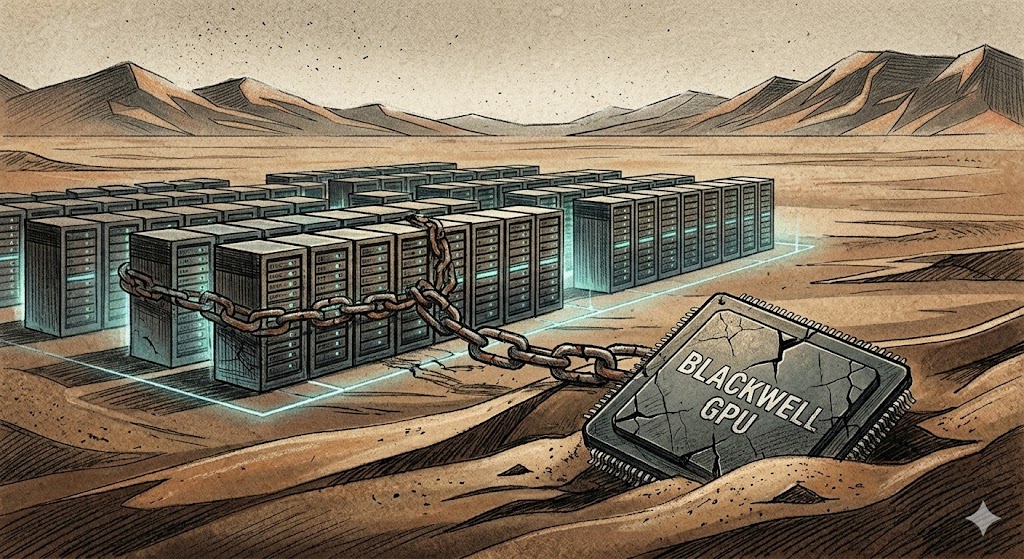
TL;DR: The market’s trillion-dollar AI boom is built on one assumption: whoever spends most on infrastructure wins. DeepSeek briefly exposed how fragile that belief is, and how quickly the system could unravel if it’s wrong. It could happen again.
On the last Monday of January, markets lost over a trillion dollars in value. Nvidia alone shed roughly $593 billion, the largest single-day drop in U.S. stock market history.
The cause: DeepSeek R1, an open-source model from China trained for a fraction of the cost of frontier systems. Its release shook market confidence by calling into question the industry maxim that whoever has the most infrastructure wins. (This reevaluation didn’t last long, and by the next day the markets had recovered.)
Nine months later, the market sits at new highs, and infrastructure spending has gone from big to absurd. OpenAI alone has pledged over $1 trillion for computing infrastructure over the next decade—against just $13 billion in annual revenue, a staggering 1:77 ratio.
We’ve entered the age of circonomics: a closed-loop economy where companies are simultaneously customers, suppliers, and investors in each other’s ecosystems. Instead of paying cash, they trade equity, warrants, and GPU access, often leasing back what they’ve sold in increasingly circular agreements. The system resembles a tangled web of interdependence, so tightly coupled that the failure of a few players could destabilize the entire ecosystem.
A single breakthrough, whether in architecture, algorithmic efficiency, or data movement, could render these trillion-dollar bets obsolete overnight. DeepSeek already proved that “bigger is better” isn’t a law of nature. A new open-source model that’s merely “good enough” could shift value upward, from infrastructure to applications, undermining the capital structure beneath today’s AI giants.
This in turn could ripple through markets, exposing how much of today’s prosperity depends on the myth of infinite scale.
AI is unquestionably a once-in-a-generation technological shift. The question is whether it truly requires mythic levels of capital expenditure to get there. When the correction eventually comes, AI won’t die; it will evolve. The next phase will reward efficiency over magnitude: smaller, modular models, decentralized compute, open source and open architectures.
In short, disruption won’t end AI, it will force it to grow up.
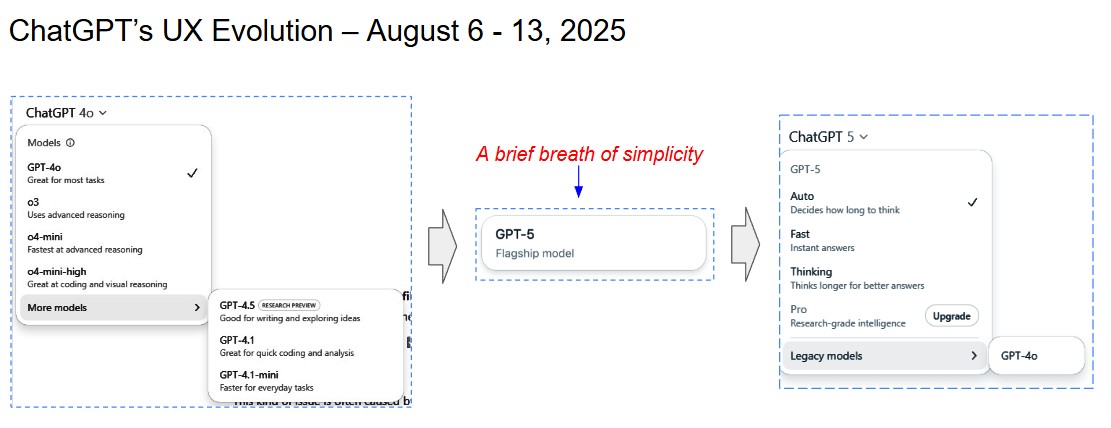
About a month ago I wrote about my frustration with ChatGPT-4o’s pull-down menu and its mess of mismatched models. I ended my post saying that I hoped ChatGPT 5 would address this. Last Thursday my prayers were answered. The pull-down was gone and with it the hodgepodge of models. In its place there was one simple clean button.
The backlash
Not long after the new model and its clean UX debuted, a hue and cry erupted in the web-o-sphere. The biggest complaint was the disappearance of GPT-4o. People were both angry and frustrated at the loss of friendliness and companionship that 4o brought (not to mention the fact that it had been incorporated into many workflows). To OpenAI’s credit they listened and responded. Within days 4o was back on the home screen as a “legacy model.”
Fun fact!
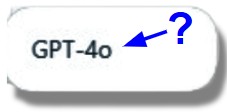
When I first started writing this, I wasn’t sure which keys to hit when typing “4o.” The “0” looked a couple of points smaller than the “4,” but I couldn’t quite tell. After asking the source, I learned it wasn’t a zero at all—it was a lowercase “o.” It turns out the “o” stood for omni, signaling multimodal capability. (I’ve got to believe that I’m not the only one surprised and confused by this)
As a follow up I asked if GPT-5 is multimodal. The answer: “Indeed.” Which then raises another question—why isn’t it called “GPT-5o”? But I digress.
The return of the pull-down
Along with 4o, came the reintroduction of the pull-down menu which, in addition to the “Legacy Models” button, presented four thinking modes to choose from (it seems the thinking modes were added in response to what some users felt was GPT-5’s slow speed and lack of flexibility).
Auto – decides how long to think
Fast – instant answers
Thinking – thinks longer for better answers
Pro – Research-grade intelligence (upgrade)
While power users must have rejoiced, I found myself, once again, confronted with a set of options lacking helpful explanations. While it was certainly an improvement over GPT-4o’s mess of models and naming conventions I found myself left with many questions:
While power users must have rejoiced, I found myself, once again, confronted with a set of options lacking helpful explanations. While it was certainly an improvement over GPT-4o’s mess of models and naming conventions I found myself left with many questions: What criteria does Auto use to determine how long to think? What tradeoffs come with Fast? What exactly qualifies as “better” in Thinking? if I’m impatient will I get lesser answers? And what the heck is “research-grade” and why would I pay more for it?
Just like GPT-4o where I rarely ventured beyond the main model, so far I have kept GPT-5 in auto mode.
Grading the model
Before grading the models myself I decided to get ChatGPT 5’s thoughts. I asked the AI to focus its grading on the UX experience, specifically to what extent a user would be able to quickly and confidently pick the right mode for a given task.
Surprisingly, it graded itself and its predecessor just as I would have. GPT-5 gave the GPT-4o UX a C– and its own, a B-. From there it went through and critiqued the experiences in detail.
At the very end, GPT-5 offered to put together a proposal for a “redesigned hybrid menu that takes GPT-5’s simplicity and pairs it with short, task-oriented descriptions so users can choose confidently without guesswork.” If only OpenAI had access to a tool like this!
Your mileage may vary
Over the past week I’ve used GPT-5 a fair amount. While I can’t measure results objectively, Auto seems to choose well. Writing, research, and analysis have been solid.
Compared to 4o I found that it spent significantly more time researching and answering questions. Not only have I noticed the increase in thinking time, but for the first time I witnessed “stepwise reasoning with visible sub-tasks.” Component topics were flashed on the screen as GPT-5 focused on each one at a time. The rigor was impressive, and the answers were detailed and informative.
Was it an improvement over 4o? Hard to tell—but the process felt more deliberate and transparent, even if it took longer.
Back to UX
And yet, we’re back to a cluttered pull-down. OpenAI isn’t alone—Anthropic and Gemini also present users with a maze of choices that lack clarity. What’s surprising is how little attention is paid to basic UX. Even simple fixes—like linking to a quick FAQ or watching a handful of users struggle through the interface—would go a long way.
As LLMs become interchangeable, the real competition will move higher up the stack. At that point, user experience will outweigh minor gains in benchmarks. It makes sense to start practicing now.
At their foundation, AI systems are massive data engines. Training, deploying, and operating AI models requires handling enormous datasets—and the speed at which data moves between storage and compute can make or break performance. In many organizations, this data movement becomes the biggest constraint. Even with better algorithms, companies frequently point to limitations in data infrastructure as the top barrier to AI success.
During the recent AI Infrastructure Field Day, Solidigm—a maker of high-performance SSDs built for AI workloads—shared how data travels through an AI training workflow and why storage plays an equally important role as compute. Their central point: AI training succeeds when storage and memory work in sync, keeping GPUs fully fed with data. Since high-bandwidth memory (HBM) can’t store entire datasets, orchestrating the flow between storage and memory is essential.
The takeaway: Well-designed storage architecture ensures GPUs can run at peak capacity, provided data arrives quickly and efficiently.
Raw Data → Data Preparation
Raw Data Set The process begins with large volumes of unstructured data written to disk, usually on network-attached storage (NAS) systems optimized for density and energy efficiency.
Data Prep 1 Batches of raw data are pulled into compute server memory, where the CPU performs ETL (Extract, Transform, Load) to clean and normalize the information.
Data Prep 2 The cleaned dataset is then stored back on disk and also streamed to the machine learning algorithm running on GPUs.
Training → Archiving
Training From a data perspective, training generates two outputs:
The completed model, written first to memory and then saved to disk.
Multiple “checkpoints” saved during training to enable recovery from failures—these are often written directly to disk.
Archive Once training is complete, key datasets and outputs are archived in network storage for long-term retention, audits, or reuse.
NVIDIA GPUDirect Storage
A noteworthy technology in this process is NVIDIA GPUDirect Storage, which establishes a direct transfer path from SSDs to GPU memory. This bypasses the CPU and system memory, reducing latency and improving throughput.
Final Thought
While having more data can lead to better model accuracy, efficiently managing that data is just as important. Storage architecture decisions directly impact both performance and power usage—making them a critical part of any serious AI strategy.
My son and I were watching a Malcolm in the Middle marathon recently when, rather than typical detergent or Nissan ads, multiple 30-second spots from Meta popped up. Each advert highlighted the virtues of open source through their Llama LLM and ended with taglines like, “Open source AI. Available to all, not just the few.” The message I took away was: Open Source AI benefits everyone. Llama is Open Source. Llama benefits everyone.
These weren’t your usual niche tech ads (see two examples below)—they were slick, mainstream productions airing during a popular family sitcom. Surprised and puzzled, I did some digging and learned these ads were rolled out at the end of last year and intensified around April and May to coincide with the release of Llama 4 and leveraging the momentum from Llama 3.1.
But is Llama truly open source? No. The Open Source Initiative (OSI), the definitive authority on open source standards, notes several critical shortfalls:
Commercial Restrictions: Limit on large-scale commercial use excludes key competitors.
Redistribution Restrictions: Violates principles of unrestricted redistribution.
Training Data Not Public: OSI’s AI-specific definition requires open access to training datasets.
Regional Restrictions: Certain geographic uses (e.g., in the EU) may be prohibited.
Meta can set whatever restrictions they want on their software, but if they impose the above restrictions, Llama doesnt qualify as “open source.”
Do the ends justify the means? On one hand, Labeling Llama as open source could dilute the definition, opening it up to interpretation and potentially undermining genuine open-source projects. Critics argue this erodes trust, blurs established norms, and disadvantages truly open projects.
On the other hand, there’s a notable benefit: Meta’s mainstream campaign significantly boosts public awareness and portrays open source as beneficial, democratizing technology and driving innovation.
Ultimately, the challenge is balancing the immense public exposure Meta’s Llama TV ads provide to the open source movement against concerns about accurately preserving the open source definition. The key question for the open source community is not whether these TV ads cause harm—they likely don’t—but how to maintain the integrity of what “open source” really means, which in the new world of AI, has become even harder.
Two examples
Meta AI TV Spot, ‘Open Source AI: Everyone Benefits’ (prosthesis) “Open source AI is an open invitation. To take our model and build amazing things… When AI is open source, it’s available to all, and everyone benefits.
Meta AI TV Spot, ‘Open Source AI: Collaboration’ (start up) “Open source AI allows universities, researchers, and scientists to collaborate using Meta’s free open-source AI Llama… potentially fast-tracking life-saving medications.”
One of the companies that impressed me at AI Infrastructure Field Days was Solidigm. Solidigm, which was spun out of Intel’s storage and memory group, is a manufacturer of high-performance solid-state drives (SSDs) optimized for AI and data-intensive workloads. What I particularly appreciated about Solidigm’s presentation was, rather than diving directly into speeds and feeds, they started by providing us with a broader context. They spent the first part of the presentation orientating us and explaining the role storage plays and what to consider when building out an AI environment. They started by walking us through the AI data pipeline: (for the TL;DR see “My Takeaways” at the bottom)
Breaking down the AI Data Pipeline
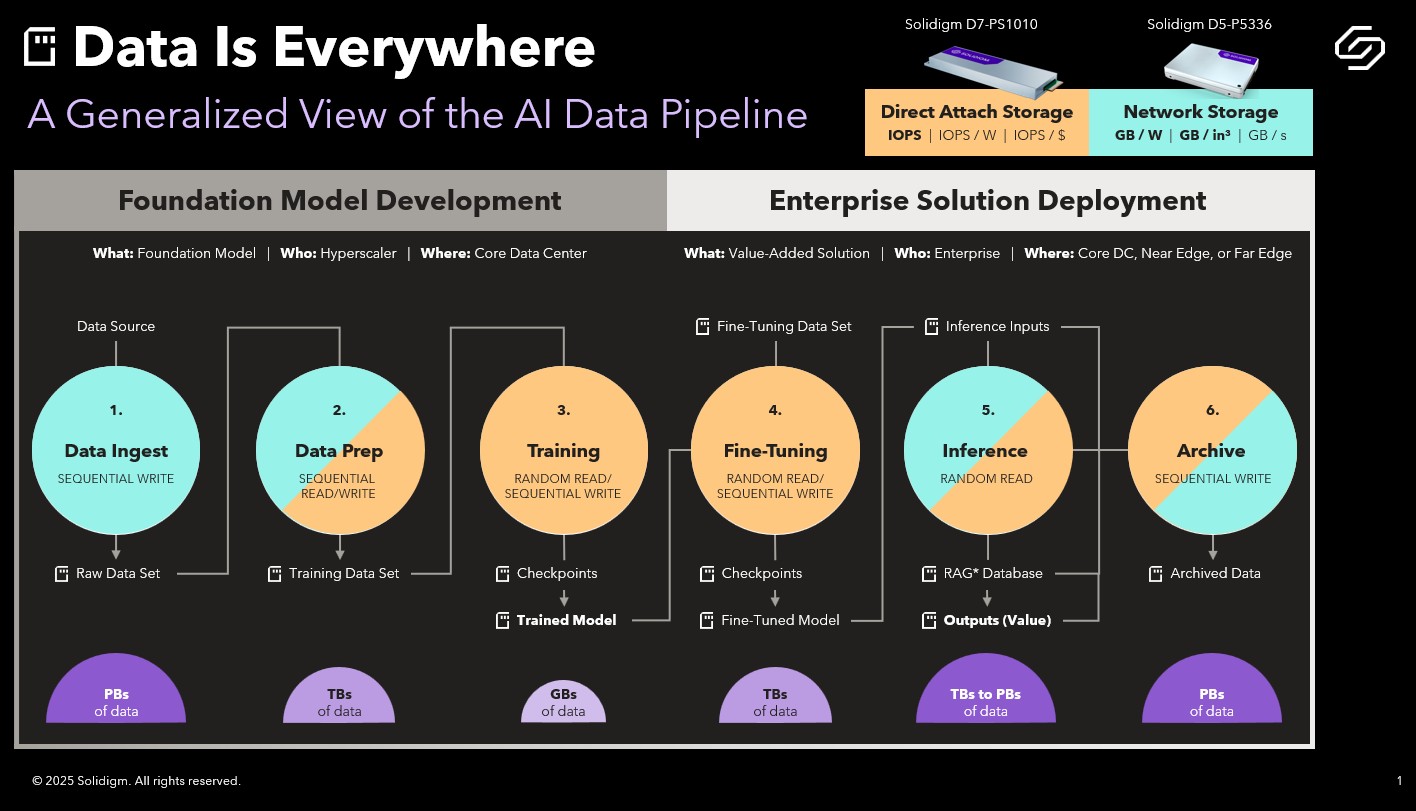
Solidigm’s Ace Stryker kicked off their presentation by breaking the AI data pipeline into two phases: Foundation Model Development on the front end and Enterprise Solution Deployment on the back end. Each of these phases is then made up of three discrete stages.
Phase I: Foundation Model Development.
The development of foundation models is usually done by a hyper-scaler working in a huge data center. Ace defined foundation models as typically being LLMs, Recommendation Engines, Chatbots, Natural Language Processing, Classifiers and Computer Vision. Within foundation model development phase, raw data is ingested, prepped and then used to train the model. The discreet steps are:
1. Data Ingest: Raw, unstructured data is written to disk.
2. Data Preparation: Data is cleaned and vectorized to prepare it for training.
3. Training: Structured data is fed into ML algorithms to produce a base (foundation) model.
Phase II: Enterprise Solution Deployment
As the name implies, phase II takes place inside the enterprise whether that’s in the core data center, the near edge or the far edge. In phase II models are fitted and deployed with the goal of solving a specific business problem:
4. Fine-Tuning: Foundation models are customized using domain-specific data (e.g., chatbot conversations).
5. Inference: The model is deployed for real-time use, sometimes enhanced with external data (via Retrieval Augmented Generation).
6. Archive: All intermediate and final data is stored for auditing or reuse.
Data Flows and Magnitude
From there took us through the above slide which lays out how data is generated and flows through the pipeline. Every item above with disk icon represents the substantial data that is generated during the workflow. The purple half circles give a sense of the relative size of the data sets by stage. (an aside: it doesn’t surprise me that Inference is the stage that generates the most data but I wouldn’t have thought that Training would be significantly less than the rest).
Data Locality and I/O Types
Ace ended our walk through by pointing out where all this data is stored as well as what kinds of disk activity takes place at each stage.
Data Locality:
Above, Network Attached Storage is indicated in blue and Direct Attached Storage is called out in yellow ie Ingest is pure NAS, Training and Tuning are all DAS, Prep, Inference and Archive are 50/50. Basically, early and late stages rely on network-attached storage (NAS) for capacity and power efficiency. Middle stages, on the other hand, use direct-attached storage (DAS) for speed, ensuring GPUs are continuously fed data. The takeaway: direct attached storage for high-performance workloads and network storage for larger, more complex datasets.
I/O Types:
As Ace explained, it’s useful to know what kinds of disk activity are most prevalent during each stage. And that knowing the I/O characteristics can help ensure the best decisions are being made for the storage subsystem. For example,
Early stages favor sequential writes.
Training workloads are random read intensive.
Something else the presentation stressed was the significance of GPU direct storage, which can reduce CPU utilization and improve overall AI system performance by allowing direct data transfer between storage and GPU memory.
My takeaways
It may sound corny but Data is the lifeblood of the AI pipeline
The AI data pipeline has both a front end and a back end. The back end usually sits in a hyperscaler where, after being ingested and prepped, the data is used to train the model. The front end is within the enterprise where the model is tuned for business-specific use then used for inference with the resulting data archived for audits or reuse.
Not only is there a lot of data in the pipeline but it grows (data begets data). Some stages amass more data than others.
There isn’t one storage type that dominates. In those stages like Data Ingest where density and power efficiency are key you want to go with NAS whereas in areas like Training and Fine Tuning, where you want performance to keep the GPUs busy, DAS is what you want.
At Cloud Field Day, I sat in on a presentation from Catchpoint, a company focused on digital experience monitoring. Their platform delivers real-time insights into the performance and availability of applications, services, and networks. What sets Catchpoint apart is how they’re reframing observability—moving away from infrastructure-centric monitoring and placing the focus squarely on end-user experience.
It started with a three-hour outage
Catchpoint’s origin story starts with co-founder and CEO Mehdi Daoudi, who previously led a team at DoubleClick (later acquired by Google) responsible for delivering 40 billion ad impressions per day. After accidentally triggering a three-hour outage, he became deeply committed to performance monitoring. “If I had to run the same team I ran back then, I would focus on the end user first,” he said. “Because that’s what matters.”
Users Don’t Live in your Data Center
“Traditional monitoring starts from the infrastructure up,” explained Mehdi explained: “but users don’t live in your data center.” Catchpoint flips the model by simulating real user activity from the edge, surfacing issues like latency, outages, or degraded performance before they affect customers—or make headlines.
no CIO wakes up hoping for “50% availability.
Mehdi illustrated the point with a story: walking into a customer network operations center where every internal system showed green lights—yet no ads were being delivered. The problem? Monitoring was focused inside the data center, not from the perspective of users on the outside. That gap in visibility led to costly blind spots.
In today’s distributed, cloud-first world—where user experience depends on a web of DNS providers, CDNs, edge nodes, and cloud services—that lesson is even more relevant. The internet may be a black box, but users expect it to work seamlessly, and they’ll publicly let you know when it doesn’t.
Catching the unknown unknowns
By reducing both mean-time-to-detect (MTTD) and mean-time-to-repair (MTTR), Catchpoint helps teams catch “unknown unknowns”—the unexpected failures APM tools often miss until it’s too late. It’s not just about knowing what went wrong, but knowing before your customers notice.
In a fragile, high-stakes digital environment, monitoring isn’t just an IT concern anymore—it’s a business-critical capability. As Mehdi put it, no CIO wakes up hoping for “50% availability.” Reliability is not a nice-to-have.
At Cloud Field Day 22, cybersecurity leader Fortinet shared its vision for managing the growing complexity of cloud-native environments. Their focus: enabling security teams to move faster, reduce alert fatigue, and make smarter decisions using AI-driven threat detection and automation.
Navigating Modern Cloud Security Challenges
In traditional data centers, firewalls protected predictable network chokepoints. But in the cloud, the security landscape is fluid—defined by ephemeral workloads, dynamic ingress/egress, and fragmented microservices. These cloud-native architectures make visibility and threat correlation far more difficult.
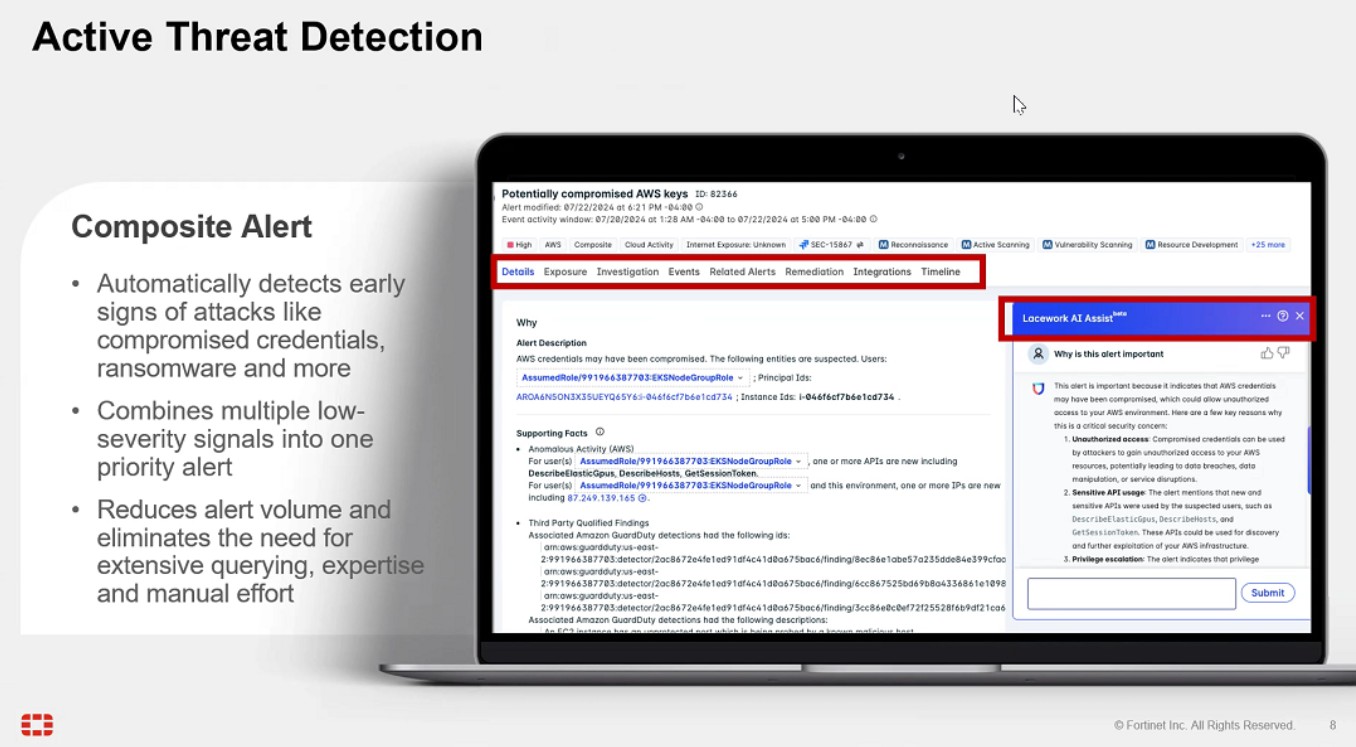
Fortinet’s response is to empower security operators with a cloud-native security platform designed to turn noisy telemetry into meaningful, actionable insight.
Inside Fortinet’s CNAPP: Composite Threat Detection at Scale
Fortinet’s Cloud-Native Application Protection Platform (CNAPP) is a unified, vendor-agnostic solution that protects across the entire cloud application lifecycle—from source code and CI/CD pipelines to infrastructure and production workloads.
Rather than simply aggregating security data, CNAPP uses machine learning to correlate low-level signals into composite risk insights—multi-source, high-confidence threat narratives. This AI-powered threat detection helps teams separate real attacks from benign anomalies and respond faster, with fewer false positives.
Built for Security Operators: AI + Context
A standout feature is the integration of large language model (LLM) assistants into the analyst workflow. These LLMs provide pre-investigation context, explain attack chains, and suggest tailored remediation actions. It’s like having a virtual teammate triaging alerts in real-time.
CNAPP also supports:
Software Composition Analysis (SCA) for code-level vulnerabilities
Infrastructure monitoring for cloud misconfigurations
Pipeline inspection for DevSecOps visibility
Runtime protection across containers, VMs, and serverless apps
Whether identifying CVEs in Kubernetes clusters or flagging anomalies in your VPC, Fortinet delivers a holistic view of cloud risk.
Final Thoughts
As organizations scale across multi-cloud and hybrid environments, cloud-native threat detection and security automation become critical. Fortinet’s CNAPP shows what’s possible when AI meets cloud security—turning volumes of raw data into clarity, action, and real-time resilience.